getByRole is not a text search with better manners; it is a hypothesis about the accessibility tree.
For testing library accessible names, the reliable mental model is that getByRole first finds elements exposed with the requested accessible role, then filters them by the browser-computed accessible name. That name may come from visible text, a label, aria-label, aria-labelledby, alt, or element-specific rules. A button reading “Save draft” can therefore be queryable as “Publish” when aria-label supplies the accessible name, so the fix is to debug the accessibility contract, not loosen the regex.
More on Testing Library Accessible Names.
getByRole('button', { name })matches accessible role first, then filters by the computed accessible name.- Accessible names can come from text content,
aria-label,aria-labelledby, labels,alt,title, and element-specific rules. - Visible text and accessible name can disagree;
aria-labelcan replace the text a sighted user sees on a button. <input type="password">has no implicit role in Testing Library’s role queries, sogetByLabelTextis usually the honest query.logRoles(container)is the fastest way to inspect the roles and names your rendered fixture actually exposes.
The three-stage model: exposed, role, name
React Testing Library queries make more sense when you treat them as an accessibility contract with three checks: can assistive technology reach the element, does the element expose the role you expect, and what name did the accessibility algorithm compute?
The official Testing Library ByRole docs describe name as an option that filters by accessible name. That small option is where many failed tests hide, because the name is not simply “nearby text.” It is a computed string derived from the rules in the W3C Accessible Name and Description Computation specification.
If you need more context, modern UI testing covers the same ground.
The useful mental picture is a three-gate path:
This model matters because each gate has a different fix. If exposure failed, changing the regex does not help. If role failed, adding a test id hides a semantic bug. If name failed, the test may be correctly telling you that your component speaks a different interface than it shows.
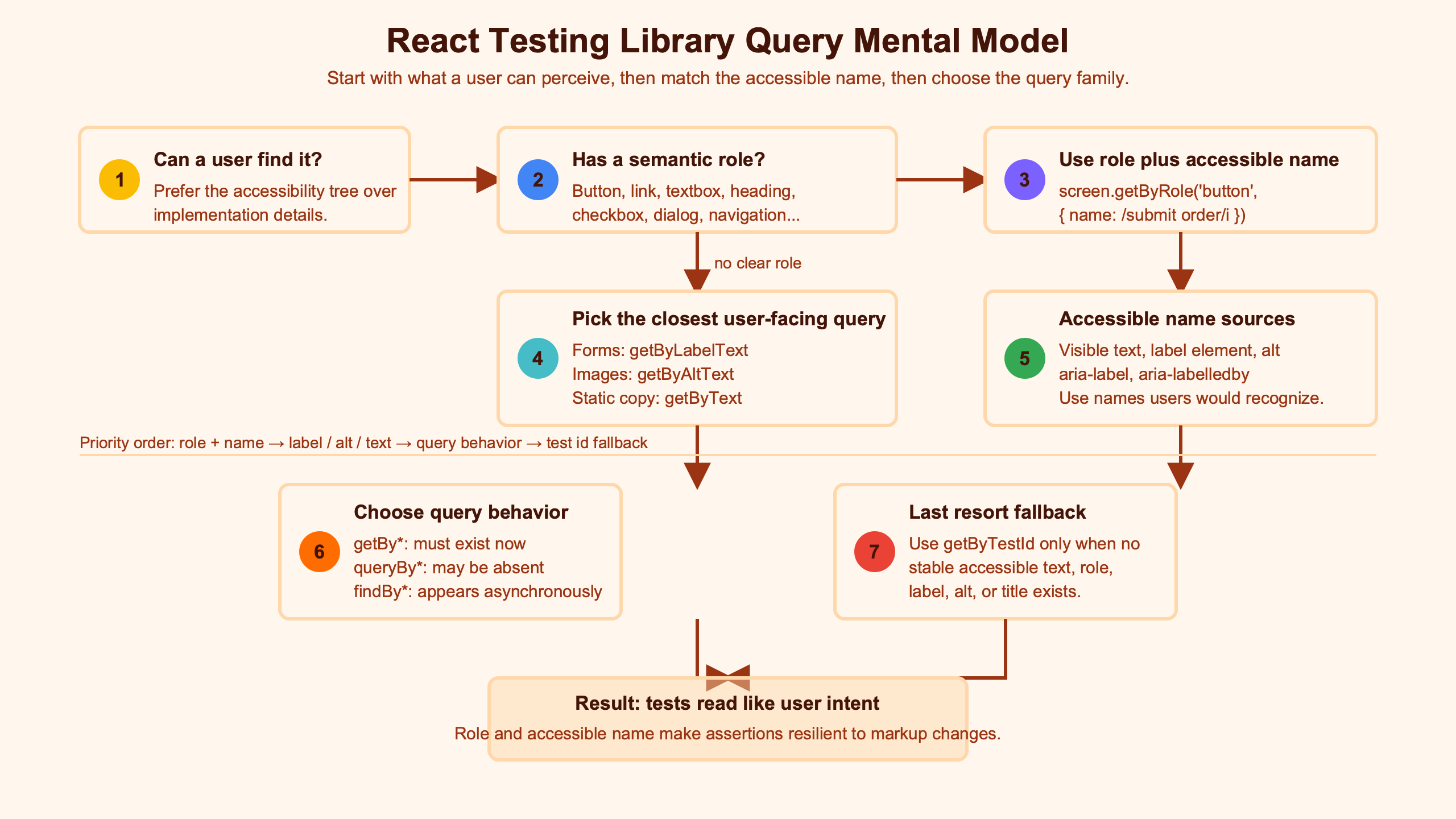
The diagram is useful because it separates “the button exists” from “the button is queryable as this role and name.” That separation is the same reason Lighthouse, Playwright accessibility snapshots, and React Testing Library often feel strict in productive ways: they reward components that expose clear semantic intent.
A failing accessible-name query is not a selector problem first. It is a claim that one part of the accessibility contract is different from your mental model.
Why visible text is not always the accessible name
The shortest way to break the “accessible name equals visible text” assumption is a button with visible text and an aria-label. Testing Library will query the computed accessible name, not the text node alone.
Here is the minimal React fixture. The visible button text is “Save draft”, but the interface name is supplied by aria-label:
I wrote about moving from Enzyme if you want to dig deeper.
import React from 'react';
import { render, screen } from '@testing-library/react';

function ConflictingButton() {
  return <button aria-label="Publish">Save draft</button>;
}

test('visible text can differ from the accessible name', () => {
  render(<ConflictingButton />);

  expect(screen.getByRole('button', { name: /publish/i })).toBeInTheDocument();

  // This fails because "Save draft" is visible text, not the computed name.
  screen.getByRole('button', { name: /save/i });
});
In the captured terminal run, the /publish/i query passed and the /save/i query failed. That is the behavior the W3C name-computation algorithm predicts: author-provided naming can override content naming for roles that allow names from authors.
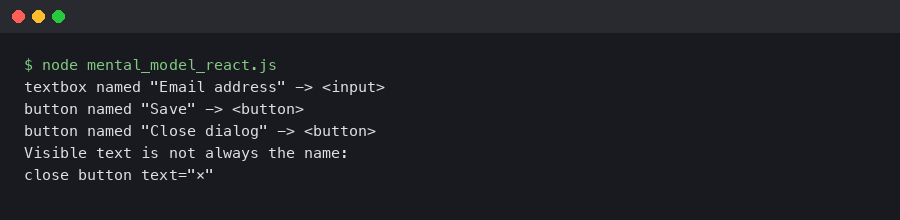
The terminal output shows the failure at the name gate, not at the exposure or role gate. Testing Library can see a button; it simply cannot find a button whose computed accessible name matches “save.”
This is where many React tests drift. A developer sees text on the page, writes getByRole('button', { name: /save/i }), and treats the failure as Testing Library being picky. The stronger read is that the component is publishing a different action to assistive technology than it is showing visually.
The fix is not always “remove aria-label.” Icon-only buttons often need an author-provided name. Text buttons usually do not. If the visible text already names the action clearly, letting the content name the control keeps the sighted interface and accessibility interface aligned.
Where names actually come from in React components
Accessible names come from different sources depending on the element and attributes involved. The name can be associated by a label, supplied directly with ARIA, composed from referenced nodes, read from text content, or taken from element-specific attributes such as image alt.
The Testing Library query priority guide recommends queries that resemble how users find elements, with getByRole high in that order because it covers exposed roles and names. But the query priority list is not the name algorithm. The algorithm lives in the platform and ARIA rules, and Testing Library reflects that model through DOM Testing Library.
See also modernizing React tests.
For form controls, these examples are the ones worth memorizing:
import React from 'react';
import { render, screen, logRoles } from '@testing-library/react';

function FormNameSources() {
  return (
    <form>
      <label htmlFor="email">Email address</label>
      <input id="email" />

      <label>
        Display name
        <input />
      </label>

      <span id="billing">Billing</span>
      <span id="zip">ZIP code</span>
      <input aria-labelledby="billing zip" />

      <input placeholder="Search docs" />

      <label htmlFor="secret">Password</label>
      <input id="secret" type="password" />
    </form>
  );
}

test('print form roles and names', () => {
  const { container } = render(<FormNameSources />);
  logRoles(container);

  screen.getByRole('textbox', { name: 'Email address' });
  screen.getByRole('textbox', { name: 'Display name' });
  screen.getByRole('textbox', { name: 'Billing ZIP code' });
  screen.getByPlaceholderText('Search docs');
  screen.getByLabelText('Password');
});
The important details are not React-specific. htmlFor/id and wrapping <label> both name text inputs. aria-labelledby can compose a name from multiple referenced nodes. Placeholder text is visible help text, but it is not a durable substitute for a label. Password inputs are the trap: they can be labeled, but they do not expose the role that a normal text input exposes for getByRole('textbox').
That last case is documented in Testing Library’s note about password inputs and implicit roles. If your login form has a password field, getByLabelText(/password/i) is not a weaker assertion. It is the query that matches the surface the control actually exposes.
Images follow a related but element-specific path. An image with alt="Product preview" can be found with getByRole('img', { name: /product preview/i }) or getByAltText(/product preview/i). The first asserts the accessible role/name pair; the second asserts the image alternative text contract directly.
When the right element has the wrong role, or no role at all
A name query cannot pass if the role query has already selected the wrong set of elements. This is the most common reason getByRole feels confusing in React tests: the requested role is a guess, but HTML semantics already decided something else.
Native HTML gives many elements implicit roles. A <button> exposes a button role. A link with a usable href exposes a link role. A normal text input exposes a textbox role. Testing Library’s role queries are built around those accessible roles, not CSS classes or component names.
If you need more context, Enzyme’s decline covers the same ground.
Explicit ARIA can change the exposed role, but that power is easy to misuse. If a design-system component renders <div role="button">, a role query may find it, but the component still needs keyboard behavior and state handling that a native <button> already has. In tests for React, Next.js, Remix, Gatsby, RedwoodJS, and Vite apps, native elements are the better default unless there is a specific platform reason to use something else.
The password-field exception deserves its own slot in the mental model because it looks like a normal input in JSX:
render(
  <label>
    Password
    <input type="password" />
  </label>
);

screen.getByLabelText(/password/i); // good
screen.getByRole('textbox', { name: /password/i }); // wrong surface
The component has a label, and users can type into it, yet the role query is not the right expression of the contract. This is why “always use getByRole” is too blunt. “Use the query that matches the accessibility surface you care about” is the better rule.
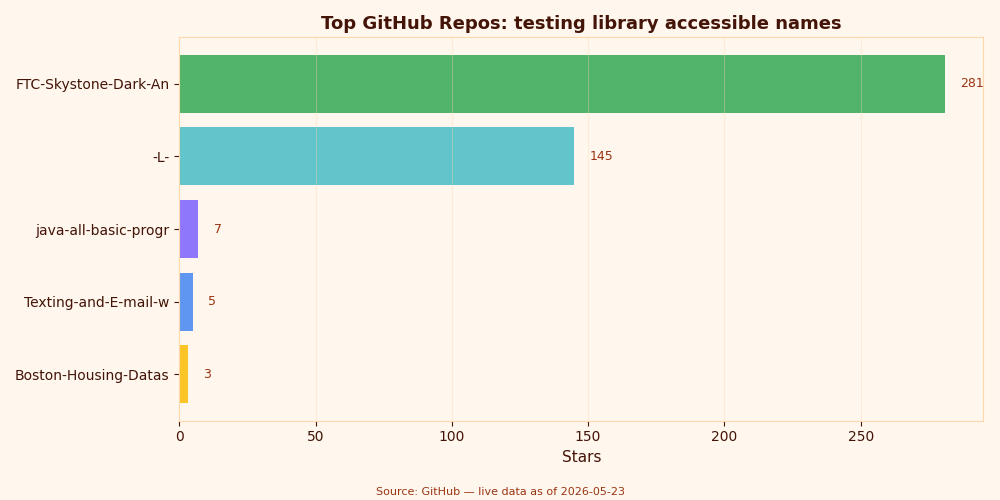
The repository snapshot is a reminder that this topic sits across several maintained packages, not one magic matcher. React Testing Library renders the component, DOM Testing Library provides the query behavior, jest-dom extends assertions, and jsdom supplies the DOM environment for many Jest and Vitest setups.
When the element exists but Testing Library cannot see it
If Testing Library cannot find an element by role, the first question is whether the element is exposed to the accessibility tree. Hidden DOM is still DOM, but accessible queries intentionally skip many hidden nodes unless you ask otherwise.
The Testing Library hidden option documents this boundary for role queries. That option is useful when testing hidden menus, dialogs before opening, or disclosure content, but it should not become a default escape hatch. If users cannot reach an element, a role query that cannot reach it is often telling the truth.
Hidden content also affects naming, and the result depends on how the hidden content participates. This fixture captures three different cases:
import React from 'react';
import { render, screen, logRoles } from '@testing-library/react';

function HiddenNameDemo() {
  return (
    <div>
      <button>
        Pay
        <span aria-hidden="true"> invoice</span>
      </button>

      <button>
        <span className="sr-only">Download report</span>
      </button>

      <span id="hidden-label" hidden>Archive project</span>
      <button aria-labelledby="hidden-label">Archive</button>
    </div>
  );
}

test('hidden text has different naming effects', () => {
  const { container } = render(<HiddenNameDemo />);
  logRoles(container);

  screen.getByRole('button', { name: 'Pay' });
  screen.getByRole('button', { name: 'Download report' });
  screen.getByRole('button', { name: 'Archive project' });
});
The first button’s aria-hidden text is not part of the name, so “Pay invoice” is not the accessible name. The second button’s visually hidden text is still exposed if the CSS hides it visually without removing it from the accessibility tree. The third case shows why aria-labelledby is special: the name can come from a referenced node even when that node is not visually displayed.
This is the point where React component abstractions can make the contract hard to see. A <Button> component may render children, inject an aria-label, hide an icon label, or forward aria-labelledby. When the test fails, inspect the rendered output instead of the component API you hoped it produced.
How to debug a failing getByRole without guessing
The fastest workflow is mechanical: print the available roles, read the names Testing Library sees, then change either the query or the component based on which gate failed. Guessing at regexes is slower and usually hides the useful signal.
DOM Testing Library exposes logRoles in its accessibility API docs. It prints accessible roles from a rendered container and includes the names that role queries can match. That makes it the first tool to reach for when a getByRole failure is surprising.
import { render, screen, logRoles } from '@testing-library/react';
import '@testing-library/jest-dom';

test('inspect before weakening the query', () => {
  const { container } = render(
    <button aria-label="Publish">Save draft</button>
  );

  logRoles(container);
  screen.logTestingPlaygroundURL();

  expect(screen.getByRole('button', { name: /publish/i })).toBeVisible();
});
The repeatable debugging loop is short:
- Run the failing test once and read the query error. It usually lists available roles when roles exist.
- Add
logRoles(container)to the smallest fixture that reproduces the failure. - Check exposure first: if the role is missing entirely, look for hidden state or semantic markup problems.
- Check role second: if the printed role is different from the requested role, fix the query or the element semantics.
- Check name last: if the role exists with a different name, inspect
aria-label,aria-labelledby, labels, text content, and hidden text.
screen.logTestingPlaygroundURL() can also turn the rendered fixture into a Testing Playground link. In the conflicting button fixture, the suggested query followed the accessible role/name pair rather than the visible text, which is exactly the teaching value of the tool: it shows the interface Testing Library is using.
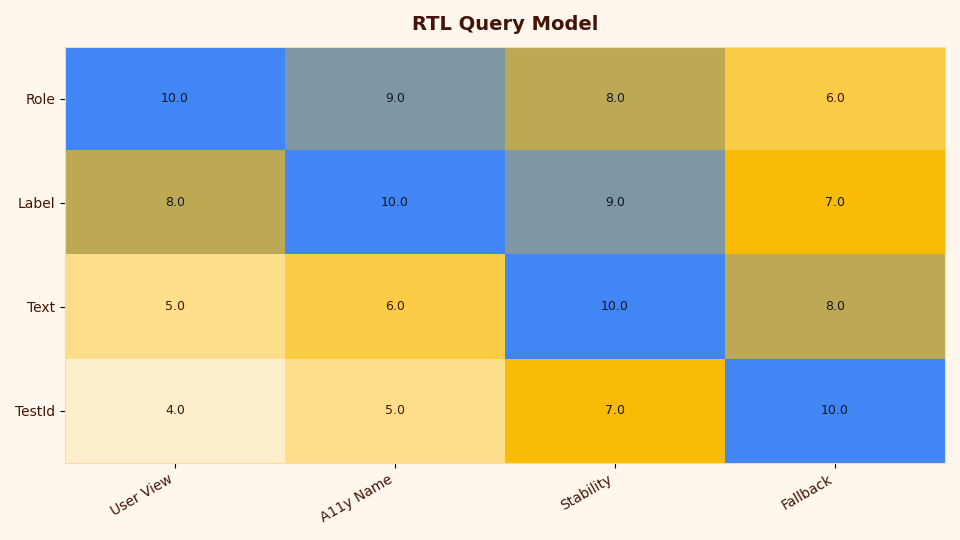
The heatmap makes the failure pattern visible: teams tend to spend time at the name gate after assuming the role gate was the hard part. For Testing Library accessible names, the productive habit is to inspect the computed name before rewriting the test.
Choosing the query that matches the contract you care about
The right query is the one that asserts the user-facing contract you mean to protect. getByRole is often the strongest query, but getByLabelText, getByText, getByAltText, and getByTitle each read a different surface.
Here is a compact fixture that shows the distinction:
Related: user-centric tests.
import React from 'react';
import { render, screen } from '@testing-library/react';

function QuerySurfaces() {
  return (
    <section>
      <button aria-label="Publish">Save draft</button>

      <label htmlFor="email">Email address</label>
      <input id="email" />

      <img src="/chart.png" alt="Revenue chart" />

      <span title="Sync status">Updated</span>
    </section>
  );
}

test('different queries read different surfaces', () => {
  render(<QuerySurfaces />);

  screen.getByRole('button', { name: 'Publish' });
  screen.getByText('Save draft');
  screen.getByLabelText('Email address');
  screen.getByAltText('Revenue chart');
  screen.getByTitle('Sync status');
});
All five queries can be valid in one test suite because they are protecting different promises. The mistake is using getByText to avoid understanding a failing role/name query, or using getByRole when the element’s real contract is a label association that role querying does not cover well.
In form-heavy React Hook Form and Formik screens, getByLabelText stays valuable because label associations are the contract users rely on. In component libraries such as Storybook examples, React Native web adapters, Tamagui, NativeBase, and React Native Paper on web, role/name checks are especially useful because abstractions can accidentally hide weak semantics under polished UI.
What Testing Library still cannot prove about accessibility
Testing Library can prove that your rendered DOM exposes queryable roles and names in the test environment. It cannot prove that the whole experience works across real browsers, screen readers, focus order, contrast, keyboard interaction, motion settings, or platform-specific assistive technology.
Many React test suites run in jsdom, not a full browser accessibility stack. jsdom is a JavaScript DOM implementation for Node, and its official GitHub repository describes it as implementing many web standards for testing and scraping. That is useful, but it is not the same as testing Safari with VoiceOver, Chrome with NVDA, or a mobile browser with touch exploration.
I wrote about component testing limits if you want to dig deeper.
For serious UI flows, pair Testing Library with browser-level checks. Playwright can drive real browsers and is a strong fit for keyboard paths, dialogs, focus management, and cross-browser behavior. Manual assistive-technology checks still matter for flows where timing, spoken output, or platform conventions affect whether the UI is actually usable.
The bounded promise is still valuable. A role/name test catches regressions before a browser test even opens: a button renamed by aria-label, a field without a label, a hidden menu item that should be visible, or a password field queried through the wrong surface. Treat it as the first accessibility contract check, not the final audit.
Methodology and source check
The mental model is the part to keep: exposure, role, name. When a getByRole query fails, do not start by loosening the matcher. Print the roles, read the computed names, and decide whether the test or the component is lying about the interface.