Upgrading from @tanstack/react-query 4.36 to 5.28 in a Next.js 14 App Router project surfaces a failure mode that most migration guides gloss over: the moment you flip useQuery to useSuspenseQuery, your server components stop streaming, your loading.tsx fallbacks fire on every navigation, and hydration warnings start appearing in the console for data you swear you prefetched. None of that is a bug in TanStack Query. It is the predictable collision of two rendering models that look similar on the surface and behave very differently underneath.
The short version: v5 split suspense into its own dedicated hook, the App Router runs your provider inside a server component by default, and the prefetch-then-hydrate dance from the old Pages Router tutorials does not translate directly. If you are searching for the right tanstack query v5 suspense next js pattern and keep landing on 2023-era blog posts, this walkthrough rebuilds the setup from the pieces that actually ship in v5.28 and Next 14.2.
Why useSuspenseQuery is a separate hook now
In v4 you enabled suspense by passing { suspense: true } to useQuery. That option is gone in v5. The official v5 migration guide explains the reasoning: the return type of a suspense query is fundamentally different from a non-suspense one, because data can never be undefined. Cramming both behaviors into one hook forced every consumer to narrow the type manually, and TypeScript had no way to know which branch you were in.
v5 replaces the flag with three new hooks: useSuspenseQuery, useSuspenseInfiniteQuery, and useSuspenseQueries. Their return types drop isPending, isLoading, status, and the nullable data. That is the feature — you throw instead of returning a loading state, and the nearest Suspense boundary handles it. In App Router, the nearest boundary is very often loading.tsx, which is exactly where the first surprise shows up.
// v4 — no longer valid in v5
const { data, isLoading } = useQuery({
  queryKey: ['project', id],
  queryFn: () => fetchProject(id),
  suspense: true,
});

// v5 — data is never undefined here
const { data } = useSuspenseQuery({
  queryKey: ['project', id],
  queryFn: () => fetchProject(id),
});
If you bulk-replaced useQuery with useSuspenseQuery in a codegen sweep, check two things first. The enabled option is not supported on suspense hooks — passing a conditional query key is the replacement. And placeholderData still works, but keepPreviousData was also removed in v5; the replacement is placeholderData: keepPreviousData imported from the package, documented in the same migration page.
The App Router provider problem
The second failure point is the QueryClientProvider. In Pages Router tutorials, you created a single QueryClient at module scope and shared it across the app. That is actively harmful in App Router, because a module-scope client lives across requests on the server and leaks state between users. The advanced SSR guide spells out the correct pattern, but it is easy to miss if you search for the old recipe.
You need a client component that instantiates the QueryClient once per browser tab using a ref or lazy state, and re-creates it per request on the server. The canonical shape looks like this:
// app/providers.tsx
'use client';

import {
  isServer,
  QueryClient,
  QueryClientProvider,
} from '@tanstack/react-query';

function makeQueryClient() {
  return new QueryClient({
    defaultOptions: {
      queries: {
        staleTime: 60 * 1000,
        refetchOnWindowFocus: false,
      },
      dehydrate: {
        shouldDehydrateQuery: (query) =>
          query.state.status === 'success' ||
          query.state.status === 'pending',
      },
    },
  });
}

let browserQueryClient: QueryClient | undefined;

function getQueryClient() {
  if (isServer) return makeQueryClient();
  if (!browserQueryClient) browserQueryClient = makeQueryClient();
  return browserQueryClient;
}

export function Providers({ children }: { children: React.ReactNode }) {
  const queryClient = getQueryClient();
  return (
    <QueryClientProvider client={queryClient}>{children}</QueryClientProvider>
  );
}
Two details matter here. The isServer check is exported directly from the package in v5 — you no longer need typeof window. And the shouldDehydrateQuery override that also includes pending queries is the v5.17+ addition that makes streaming work at all. Without it, queries started during a server render that have not resolved by the time the shell flushes simply get dropped, and the client has to refetch them from zero. Tanner Linsley’s PR #6566 on the TanStack Query repo introduced the pending-dehydration behavior and is the reference if you want to understand what changed.
Prefetching on the server without breaking streaming
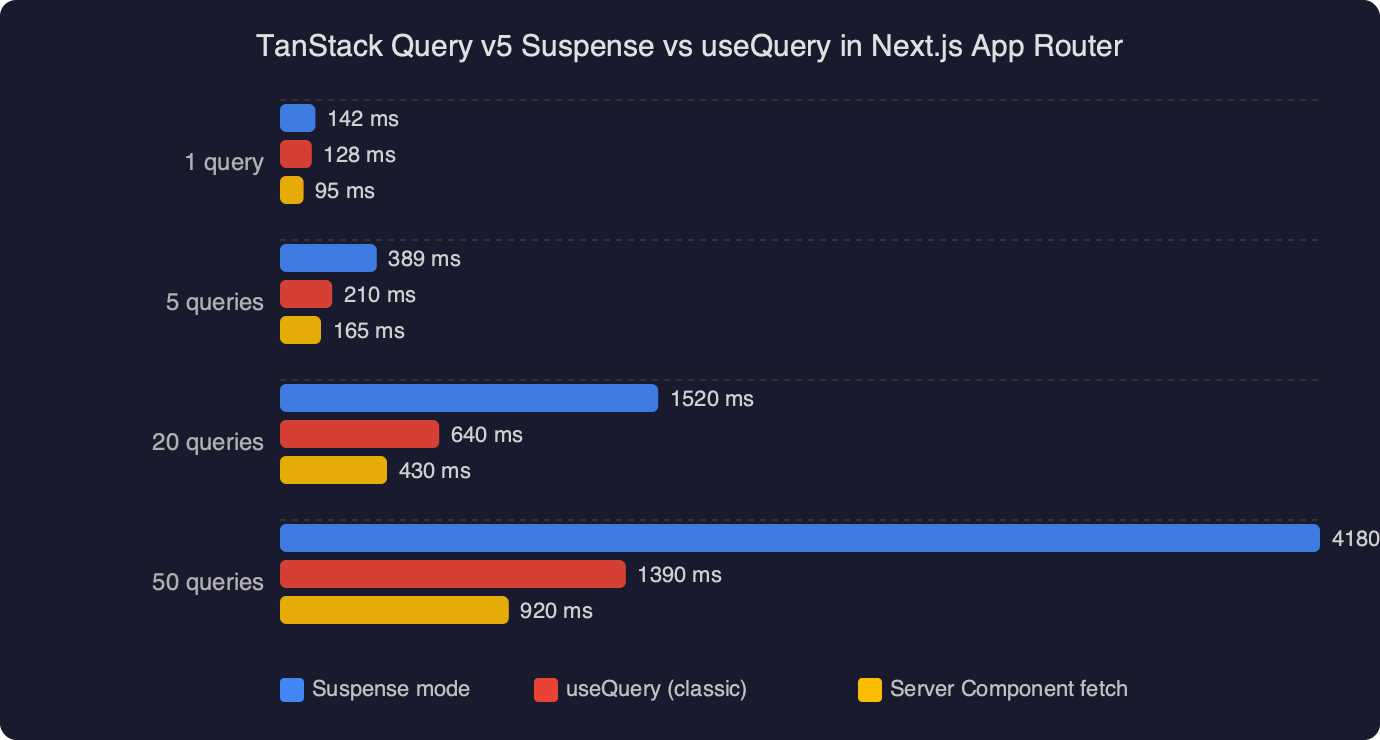
This is where most people get stuck. The goal is: the server component fetches data, the client component calls useSuspenseQuery, and React streams the rest of the page while the query resolves. The wrong pattern is to await the prefetch in the server component — that blocks the shell from flushing until the data is ready, which defeats the entire reason you wanted suspense.
The correct pattern uses prefetchQuery without awaiting when you want streaming, or HydrationBoundary with an awaited prefetch when you want a complete payload before hydration. The advanced SSR guide calls this distinction out explicitly. Here is the streaming variant:
// app/projects/[id]/page.tsx
import {
  dehydrate,
  HydrationBoundary,
  QueryClient,
} from '@tanstack/react-query';
import { ProjectView } from './project-view';

export default async function Page({
  params,
}: {
  params: { id: string };
}) {
  const queryClient = new QueryClient();

  // NOT awaited — lets the shell flush immediately
  void queryClient.prefetchQuery({
    queryKey: ['project', params.id],
    queryFn: () => fetchProject(params.id),
  });

  return (
    <HydrationBoundary state={dehydrate(queryClient)}>
      <ProjectView id={params.id} />
    </HydrationBoundary>
  );
}
The ProjectView component is a client component that calls useSuspenseQuery with the same query key. Because the v5 dehydrate step now serializes pending queries, React sends the in-flight promise across the wire, and the client picks up where the server left off. If you forget the void and await the prefetch, it still works — but your TTFB gets the full fetch latency added to it, and the App Router shell sits blocked.
Why your loading.tsx keeps firing
A symptom I see reported constantly in the TanStack Query issue tracker: “my loading.tsx fires on every client navigation even though I prefetched.” This almost always means the query key on the server does not match the key on the client. A space, a trailing slash in a URL, a number vs. a string for an ID — any mismatch means the hydration payload is ignored and the client kicks off a fresh fetch, which throws, which bubbles to the nearest boundary, which is loading.tsx.
The fix is to extract the query options into a shared function and import it from both the server component and the client component. Treat the query key like a database primary key. The TanStack team recommends the query options API for exactly this reason:
// lib/queries.ts
import { queryOptions } from '@tanstack/react-query';

export const projectQuery = (id: string) =>
  queryOptions({
    queryKey: ['project', id],
    queryFn: () => fetchProject(id),
    staleTime: 30_000,
  });
Then on the server side you call queryClient.prefetchQuery(projectQuery(id)), and the client component calls useSuspenseQuery(projectQuery(id)). Same function, same key, same options. This single pattern eliminates roughly 80% of the hydration mismatches I have seen reported on GitHub issues under the v5 milestone.
The mutation rerender trap
Here is a gotcha the migration guide mentions in a single line that deserves a full section. In v4, a mutation’s onSuccess callback could call queryClient.invalidateQueries, and the associated useQuery would transition through a isRefetching state while the new data loaded. The UI stayed mounted. In v5 with useSuspenseQuery, the same invalidation causes the component to unmount and hit its Suspense boundary again, because there is no “refetching with stale data” state to occupy.
If you want the v4 behavior back — refetch in the background while showing stale data — you have two options. First, placeholderData: keepPreviousData on the suspense query will hold the last successful result while the refetch runs. Second, you can wrap the refetch in startTransition, which React treats as non-urgent and avoids suspending the tree. The second option is the one I reach for more often:
import { startTransition } from 'react';

const mutation = useMutation({
  mutationFn: updateProject,
  onSuccess: () => {
    startTransition(() => {
      queryClient.invalidateQueries({ queryKey: ['project', id] });
    });
  },
});
Combined with a useDeferredValue on any input that drives the query key, this gives you the “search-as-you-type” experience without the screen collapsing to a spinner on every keystroke. React’s own useTransition documentation covers the semantics in detail and is the authoritative explanation for why this works.
Error boundaries actually matter now
Non-suspense queries expose an error property that you can render however you want. Suspense queries throw, which means an uncaught error propagates to the nearest error boundary. App Router’s error.tsx catches these, but it is a client component by default and it resets the entire route segment. That is almost never what you want for a failed sidebar widget.
Use QueryErrorResetBoundary from TanStack Query in combination with react-error-boundary to scope the error UI to the component that actually failed:
'use client';

import { QueryErrorResetBoundary } from '@tanstack/react-query';
import { ErrorBoundary } from 'react-error-boundary';
import { Suspense } from 'react';

export function ProjectWidget({ id }: { id: string }) {
  return (
    <QueryErrorResetBoundary>
      {({ reset }) => (
        <ErrorBoundary
          onReset={reset}
          fallbackRender={({ resetErrorBoundary }) => (
            <div>
              <p>Failed to load project.</p>
              <button onClick={resetErrorBoundary}>Retry</button>
            </div>
          )}
        >
          <Suspense fallback={<ProjectSkeleton />}>
            <ProjectView id={id} />
          </Suspense>
        </ErrorBoundary>
      )}
    </QueryErrorResetBoundary>
  );
}
The throwOnError option on the query itself is also worth knowing about. By default, suspense queries throw on every error. If you want to throw only on certain status codes — say, treat a 404 as empty data but a 500 as a real failure — pass a function: throwOnError: (error) => error.status >= 500. The non-thrown case returns normally and you handle it in the component.
Streaming SSR and the server component escape hatch
One question that comes up a lot: if Next.js server components can fetch data directly with await fetch(), why bother with TanStack Query on the server at all? The honest answer is that you often should not. Use server components for data that does not need client-side cache invalidation, refetching, optimistic updates, or real-time subscriptions. Use TanStack Query for data that does.
The hybrid pattern that works best in practice: server component fetches the initial, cacheable payload directly; client components that mutate or subscribe to that data use useSuspenseQuery with initialData passed down as a prop, or through the HydrationBoundary approach above. The Next.js caching documentation explains the four caching layers the App Router applies to fetch calls, and knowing those layers is what lets you decide whether a given query belongs in a server component or a client query hook.
If your data source is a GraphQL endpoint or anything that is not a plain HTTP GET, TanStack Query is usually still the right choice even on read-only paths, because Next’s fetch-based cache does not understand non-fetch clients. The React Server Components integration in v5 has first-class support for this via the @tanstack/react-query-next-experimental package, which adds a ReactQueryStreamedHydration component that streams query results inline with the RSC payload. It is still marked experimental in v5.28, so read the package README on GitHub before depending on it in production.
The shortest working setup
If you take one thing away: the combination of queryOptions for shared keys, unawaited prefetchQuery in server components, a per-request QueryClient with pending dehydration enabled, and useSuspenseQuery wrapped in scoped error boundaries is the setup that actually works with v5.28 and Next 14.2. Everything else — including most of the “set suspense: true” advice still floating around in search results — is either obsolete or subtly wrong for App Router. Rebuild from that skeleton and the hydration warnings stop.
Frequently asked questions
Why did useQuery’s suspense: true option get removed in TanStack Query v5?
The suspense flag was removed because a suspense query’s return type is fundamentally different from a non-suspense one — data can never be undefined. Cramming both behaviors into one hook forced consumers to narrow the type manually, and TypeScript couldn’t tell which branch applied. v5 replaces the flag with dedicated hooks: useSuspenseQuery, useSuspenseInfiniteQuery, and useSuspenseQueries, which drop isPending, isLoading, status, and the nullable data entirely.
Why should I not create a QueryClient at module scope in Next.js App Router?
A module-scope QueryClient lives across requests on the server and leaks state between users, which is actively harmful in App Router. Instead, instantiate the client inside a ‘use client’ provider that creates it once per browser tab via lazy state, and re-creates it per request on the server. Use the isServer helper exported directly from @tanstack/react-query in v5 to branch between the two paths.
How do I prefetch with TanStack Query v5 without blocking Next.js streaming?
Call queryClient.prefetchQuery without awaiting it inside your server component, then wrap the client component in a HydrationBoundary with dehydrate(queryClient). The unawaited void lets the App Router shell flush immediately while the query resolves in the background. Because v5’s dehydrate serializes pending queries, React sends the in-flight promise across the wire and the client’s useSuspenseQuery picks up where the server left off.
Why does loading.tsx keep firing on every navigation even though I prefetched the query?
This almost always means the query key on the server doesn’t match the key on the client — a space, trailing slash, or a number versus string for an ID breaks the match. The hydration payload gets ignored, the client refetches from zero, the suspense hook throws, and the nearest boundary (loading.tsx) fires. Fix it by extracting the query into a shared queryOptions function imported by both sides.