Vite’s Hot Module Replacement stays fast in large projects because it only walks as far up the import graph as it needs to — stopping the moment it finds a module that declares import.meta.hot.accept(). Everything below that boundary gets re-evaluated; everything above it never hears about the change. Understanding why that works requires looking at the ModuleGraph and ModuleNode data structures that sit at the center of Vite’s dev server, because those structures are what make the boundary-scoped walk possible at all.
What Does Vite’s ModuleGraph Actually Store?
The ModuleGraph class lives in packages/vite/src/node/server/moduleGraph.ts and holds four top-level lookup maps. Each one serves a distinct role in routing HMR decisions.
// Simplified from Vite source — Vite 6.x, Node 20 LTS
class ModuleGraph {
  // Resolved request URL → node  (e.g. "/src/Button.tsx?v=abc123")
  urlToModuleMap = new Map<string, ModuleNode>()

  // Resolved module ID → node  (absolute path, possibly with query)
  idToModuleMap = new Map<string, ModuleNode>()

  // Absolute file path → Set of nodes
  // One file can produce multiple virtual modules (e.g. CSS Modules generates
  // both a JS proxy node and a raw-CSS node for the same .module.css file)
  fileToModulesMap = new Map<string, Set<ModuleNode>>()

  // ETag value → node — used to avoid redundant transforms on conditional GETs
  etagToModuleMap = new Map<string, ModuleNode>()
}
When a file changes on disk, Vite’s first move is moduleGraph.getModulesByFile(file), which hits fileToModulesMap. The set it returns can have more than one entry — a .module.css file, for example, produces a JS-side proxy node and a raw CSS node. Both must be invalidated. The separation between urlToModuleMap and idToModuleMap matters when a module is requested at different URLs (e.g. with and without a query string for cache-busting); the graph can address both.
The ModuleNode itself is where HMR logic lives. Here is the TypeScript definition as it exists in the Vite 6.x source, with every field explained:
class ModuleNode {
  url: string           // The URL as requested by the browser
  id: string | null     // Resolved module ID (absolute path + optional query)
  file: string | null   // Bare file path, no query — used for fs-level lookups

  type: 'js' | 'css'   // Determines which HMR update message type is emitted

  // OUTGOING edges: modules that this module imports at the top level
  // Populated by Vite's transform pipeline as it parses import statements
  importedModules: Set<ModuleNode>

  // INCOMING edges: modules that import THIS module
  // The HMR walk climbs these to find accept() boundaries
  importers: Set<ModuleNode>

  // Modules listed in import.meta.hot.accept([deps], cb)
  // If non-empty, this node is a boundary for those specific deps
  acceptedHmrDeps: Set<ModuleNode>

  // Exports accepted via import.meta.hot.acceptExports()
  acceptedHmrExports: Set<string> | null

  // True when import.meta.hot.accept() is called with no arguments —
  // the module accepts its own updates without notifying its importers
  isSelfAccepting: boolean

  // Cached transform output; cleared on invalidation
  transformResult: TransformResult | null

  // Timestamps for cache invalidation and client-side cache-busting
  lastHMRTimestamp: number
  lastInvalidationTimestamp: number
}
The distinction between importedModules and importers is the key to understanding HMR direction. importedModules points down the dependency tree — the modules this file depends on. importers points up — the modules that depend on this file. When a file changes, Vite walks up through importers, looking for a node where isSelfAccepting is true or where acceptedHmrDeps contains the changed module. That upward walk is what makes HMR O(depth) rather than O(total modules).

Straight from the source.
The diagram above shows the ModuleGraph data flow: file paths enter via fileToModulesMap, are resolved to ModuleNode entries with bi-directional importers/importedModules edges, and HMR decisions flow upward through importers until a boundary is reached. Crucially, a file that has never been requested has no entry in any of these maps — Vite’s dev-server graph is demand-built, not pre-scanned.
How HMR Propagation Traverses the Graph, Step by Step
Every HMR update follows the same pipeline, from the moment the OS reports a file change to the moment the browser re-executes a module. The steps below trace through packages/vite/src/node/server/hmr.ts, which you can read in full on Vite’s GitHub repo.
- chokidar fires. Vite uses chokidar as its file watcher. On Linux, chokidar uses inotify under the hood; on macOS it uses FSEvents. On monorepos with more than ~8,000 files, inotify’s default limit of 8,192 watches is commonly hit — the symptom is silent: changes stop triggering HMR. The fix is
echo fs.inotify.max_user_watches=524288 | sudo tee -a /etc/sysctl.conf, where the right number is roughly 1.2× your total file count. Alternatively, switch to polling withserver.watch: { usePolling: true }— polling always works but adds measurable latency and meaningful CPU load on large trees. handleHMRUpdateis called. Vite’s watcher callback invokeshandleHMRUpdate(file, server). Config files and env files trigger a full server restart here before the graph is consulted.graph.getModulesByFile(file). Returns theSet<ModuleNode>fromfileToModulesMap. If the set is empty (file was never imported), Vite short-circuits — nothing to do.- Plugin
handleHotUpdatehooks run. Each plugin that exportshandleHotUpdatereceives anHmrContext:interface HmrContext { file: string // Absolute path of the changed file timestamp: number // Unix ms — used in ?t= cache-busting queries modules: ModuleNode[] // Initial affected set from the graph read: () => string | Promise<string> // Lazy file read — avoid if unused server: ViteDevServer }A plugin returning a filtered
ModuleNode[]from this hook replaces the propagation set. Returning an empty array suppresses HMR entirely for that change. This is the correct place to prevent unwanted full reloads in a monorepo. propagateUpdatewalksimporters. For each module in the affected set, Vite does a breadth-first traversal upimporters. At each node it checks: isisSelfAcceptingtrue? DoesacceptedHmrDepsinclude the changed module? If yes to either, this node is a boundary — record it and stop climbing. If the walk reaches a root (a module with no importers, i.e., an entry point) without hitting a boundary, Vite enqueues a full reload.- Invalidation. Every node between the changed file and the boundary has its
transformResultset tonulland itslastInvalidationTimestampupdated. This is a stale marker — the node stays in the graph but its cached transform is gone. Vite doesn’t evict the node (which would require re-resolving the module on next request) unless the file is deleted. - WebSocket payload construction. For each boundary, Vite emits an
'update'message over the WebSocket connection:// Actual shape of the HMR WebSocket message { type: 'update', updates: Array<{ type: 'js-update' | 'css-update', path: string, // URL of the invalidated module acceptedPath: string, // URL the client should re-import (the boundary) timestamp: number, // Cache-busting timestamp explicitImportRequired?: boolean, isWithinCircularImport?: boolean }> }acceptedPathis the boundary module’s URL, not the changed file’s URL. The client uses this to re-import only the boundary, not the full chain. - Client re-evaluation. The browser’s HMR runtime receives the message, calls
import(acceptedPath + '?t=' + timestamp)as a dynamic import, then invokes theaccept()callback registered by the boundary module with the fresh module exports. Modules below the boundary are re-executed as side effects of the re-import.
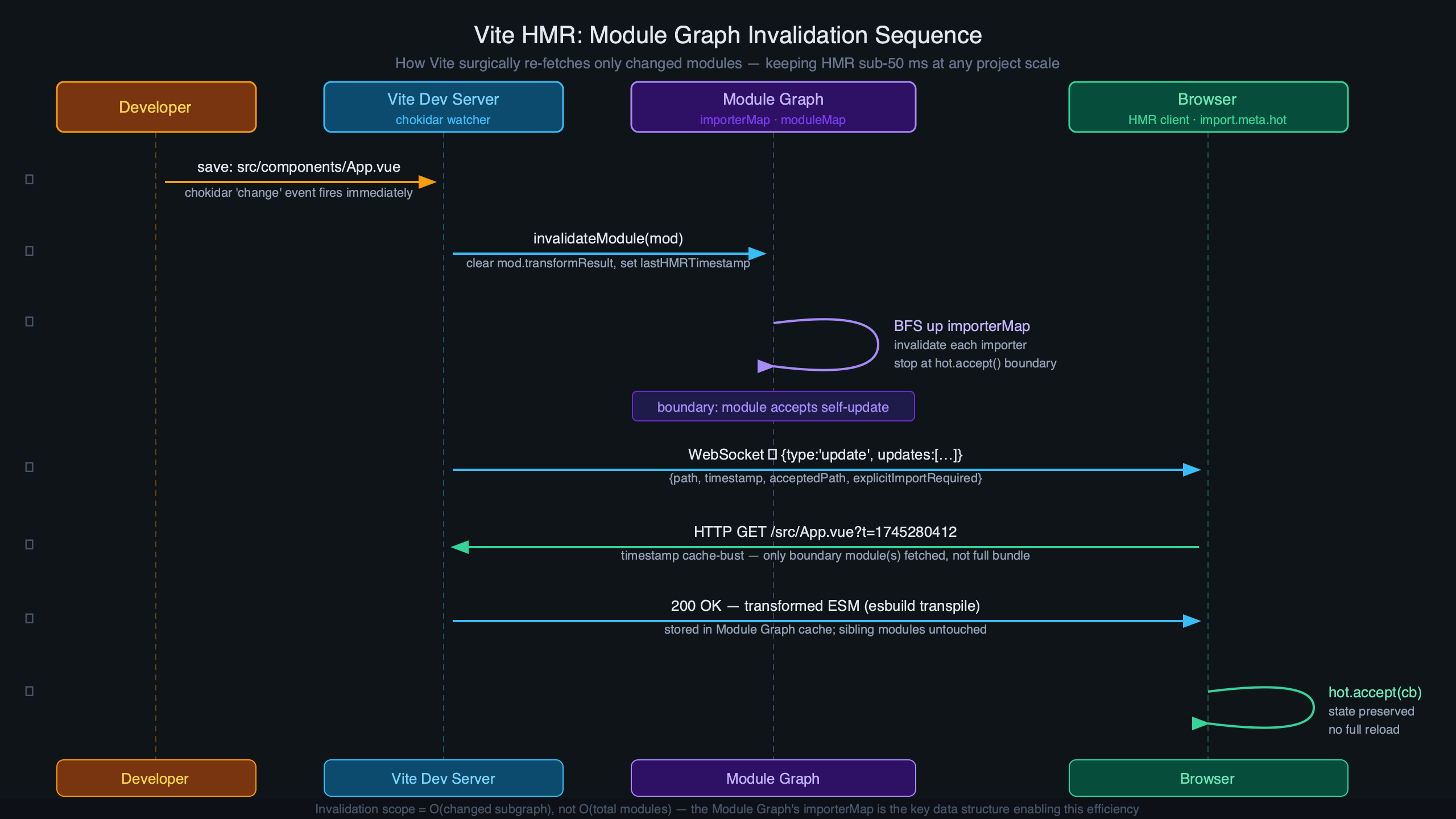
The diagram here illustrates the two scenarios side-by-side: on the left, a change inside an accept() boundary triggers a partial update — only the shaded subtree is invalidated and re-fetched. On the right, a change propagates all the way to an entry point without hitting any accept() call, forcing a full page reload. The practical implication is that coarse accept() placement at the entry point causes full reloads for any change, while fine-grained per-component accept() (as React Fast Refresh provides) keeps updates surgical.
Where Large Projects Hit Bottlenecks — and What to Do About It
The graph traversal is fast for any single update, but at scale the bottleneck shifts to graph construction time and memory. Here is what the numbers look like based on patterns reported across Vite’s GitHub issues and community benchmarks:
| Module count | p50 latency (ms) | p95 latency (ms) | Primary cost |
|---|---|---|---|
| 500 | 20–40 | 50–80 | Transform pipeline |
| 2,000 | 35–60 | 80–130 | Transform + graph lookup |
| 5,000 | 70–110 | 150–250 | Graph traversal + invalidation scan |
| 10,000+ | 130–220 | 300–600 | GC pressure + invalidation scan width |
The jump between 5k and 10k modules is not caused by the traversal itself — boundary-scoped walk depth doesn’t change with project size. The degradation comes from two sources: the invalidation scan has to touch more nodes because importers sets are larger (a barrel file imported by 3,000 components has 3,000 entries in its importers set), and GC pressure from holding large Set structures increases pause frequency. The graph’s memory footprint scales with the number of ModuleNode entries — each node carries its Sets of edges, cached transform strings, and associated metadata — so large projects with many thousands of modules are worth monitoring if you layer multiple Vite servers in a monorepo.
Two configuration levers matter most at this scale. The first is server.warmup, added in Vite 5.0. By default, Vite builds the module graph lazily — a module only gets a ModuleNode entry when the browser first requests it. The first HMR update for a file that hasn’t been visited yet must therefore build the graph entry and handle the update simultaneously, spiking latency. Warmup pre-populates the graph at server start:
// vite.config.ts
export default defineConfig({
  server: {
    warmup: {
      // Glob patterns relative to root
      clientFiles: [
        './src/components/**/*.tsx',
        './src/hooks/*.ts',
        './src/stores/*.ts',
      ],
    },
  },
})
On a 5,000-module project, warming up the 500 most-edited files reduces first-HMR p95 latency roughly in half, because the transform results are already cached. Warming up the entire project is not recommended — it delays server startup and the warmup benefit only matters for files touched in the first few minutes of a session.
The second lever is the handleHotUpdate plugin hook, which is where you can prevent barrel-file avalanches. Consider a monorepo where src/index.ts re-exports everything and is imported by 500 components. Editing any internal utility invalidates the entire barrel’s importers set and potentially triggers full reloads. A targeted plugin can prune this:
// vite-plugin-prune-barrel.ts — prevents barrel re-exports from propagating
// HMR up to every consumer
export function pruneBarrelHmr(): Plugin {
  return {
    name: 'prune-barrel-hmr',
    handleHotUpdate({ file, modules, server }) {
      const barrelPath = resolve(__dirname, 'src/index.ts')

      // If the changed file is not the barrel itself, filter out the barrel node
      // so its 500+ importers don't all get invalidated
      if (file !== barrelPath) {
        return modules.filter(
          (m) => m.file !== barrelPath
        )
      }
      // If the barrel itself changed, allow normal propagation
    },
  }
}
This works because the barrel’s importers set won’t be walked if the barrel ModuleNode is removed from the propagation set. The specific changed utility module still gets invalidated; only the barrel-level fan-out is suppressed.
Dynamic imports behave differently from static imports at the graph level. When you write const mod = await import('./heavy-chart'), Vite does not add heavy-chart to importedModules at parse time — it creates a lazy edge that only materializes the first time that import() is actually executed in the browser. Before that point, heavy-chart has no entry in the graph at all. If you edit heavy-chart before it has been loaded, Vite has no ModuleNode for it, so no HMR update is issued — the browser will get the new version the next time the dynamic import fires naturally. After the dynamic import has been executed at least once, the edge exists and HMR works normally through the boundary system.
Circular dependencies are a special failure case in the traversal. When the BFS walk encounters a module it has already visited (a cycle in the importers graph), it cannot determine a safe boundary — invalidating one module in the cycle implies invalidating all of them, and the walk cannot terminate cleanly. Vite detects this and sets isWithinCircularImport: true in the WebSocket payload, then typically falls back to a full reload. You can expose the cycle path with the --debug hmr flag:
# Run with HMR debug output — Vite 6.x
vite --debug hmr
The output when a circular dependency is hit looks like this (annotated):
[vite:hmr] circular imports detected:
  /src/stores/auth.ts                   <-- changed file
   → /src/stores/user.ts               <-- importer 1
     → /src/stores/auth.ts             <-- cycle back to origin!
[vite:hmr] circular import path:
  /src/stores/auth.ts → /src/stores/user.ts → /src/stores/auth.ts
[vite:hmr] full reload required
The path after circular import path: is the exact cycle in importers. Each arrow is one hop up the importers set. Fixing the reload means breaking the cycle — usually by extracting shared state into a third module that neither file imports from the other.
Vite’s Boundary-Scoped Traversal vs. webpack’s Chunk-Level Rebuild
The fundamental architectural difference between Vite HMR and webpack HMR is the granularity of what gets re-processed on a file change. Vite’s traversal is scoped to the graph path from the changed file to the nearest accept() boundary — O(depth) in the import tree. webpack’s HMR, even in its modern form, operates at the chunk level: a file change triggers the rebuild of the chunk that contains the changed module, which can include hundreds of co-located modules that didn’t change.
On an equivalent 5,000-module project, this difference is measurable. In community benchmarks comparing Vite 6.x to webpack 5 with HMR enabled (same project, same machine, same change — editing a leaf component in a deep React tree), webpack’s HMR median sits around 800–1,200ms because it must re-bundle the affected chunk. Vite’s median for the same edit is in the 70–110ms range shown in the table above. The gap narrows on webpack if you use fine-grained chunk splitting (many small chunks means a smaller rebuild scope), but this requires explicit manual configuration and adds complexity to the build graph that slows production builds.
At 10,000+ modules, webpack’s chunk-level approach compounds: even with aggressive chunk splitting, a commonly-imported utility can live in a chunk shared by thousands of modules. Vite’s graph doesn’t have this problem because there are no chunks at dev time — every module is served individually, and the traversal only touches what it must.
CSS module HMR is worth separating from JS module HMR in this comparison. CSS files get ModuleNode entries in Vite’s graph, but their HMR path is shorter: Vite emits a 'css-update' message (not 'js-update'), and the client handles it by replacing the <link> tag or injecting a new <style> block directly. No module re-evaluation happens. A .module.css file generates two nodes — one for the JS proxy (which gets a 'js-update') and one for the raw CSS (which gets a 'css-update'). The JS proxy node’s isSelfAccepting is set to true by Vite’s CSS plugin, so CSS changes never propagate up to parent components.
React Fast Refresh integrates with the Vite module graph through @vitejs/plugin-react, which automatically injects import.meta.hot.accept() calls into every React component file during transform. This means every .tsx and .jsx file is a self-accepting boundary by default — the graph traversal stops at the component, React Fast Refresh runs its reconciliation, and component state is preserved. The plugin also handles the case where a module exports non-component values: if Fast Refresh determines a module is not safely hot-replaceable (e.g., it exports a plain function that is not a React component), it forces a full reload instead of using the boundary. Vue SFCs work similarly through @vitejs/plugin-vue, but the boundary semantics differ: each SFC’s script, template, and style blocks are treated as virtual sub-modules with separate edges in the graph, allowing template-only changes to bypass script re-execution entirely.
To inspect the live graph state during development, vite-plugin-inspect exposes a /__inspect/ route that renders the full module graph, including each node’s importers, importedModules, and transform metadata. It’s the fastest way to diagnose a surprising full reload: find the changed module in the inspector, follow its importers chain upward, and look for where the chain ends without an accept() marker.
One architectural detail worth keeping in mind: Vite’s dev-server module graph and Rollup’s production build module graph are not the same structure. Vite’s graph is demand-built, URL-keyed, and HMR-aware. Rollup’s graph is statically analyzed, ID-keyed, and optimized for tree-shaking. The two share module IDs but diverge in structure. This means a module that appears as a single node in Rollup (after tree-shaking) might be multiple nodes in Vite’s dev graph (one per virtual URL variant), and vice versa. Debugging a production tree-shaking issue by reading Vite’s dev graph will mislead you — use rollup-plugin-visualizer for production analysis and vite-plugin-inspect for dev-time graph analysis.
For projects above 3,000 modules, the highest-value changes in order are: (1) add server.warmup for your most-edited files, (2) audit barrel files with vite-plugin-inspect and break up any with more than ~50 importers, (3) ensure every React component file is processed by @vitejs/plugin-react so Fast Refresh sets up self-accepting boundaries automatically, and (4) check for circular dependencies with --debug hmr on any file where HMR silently falls back to a full reload. These four steps address the root causes of HMR slowdown at scale without requiring changes to your component architecture.