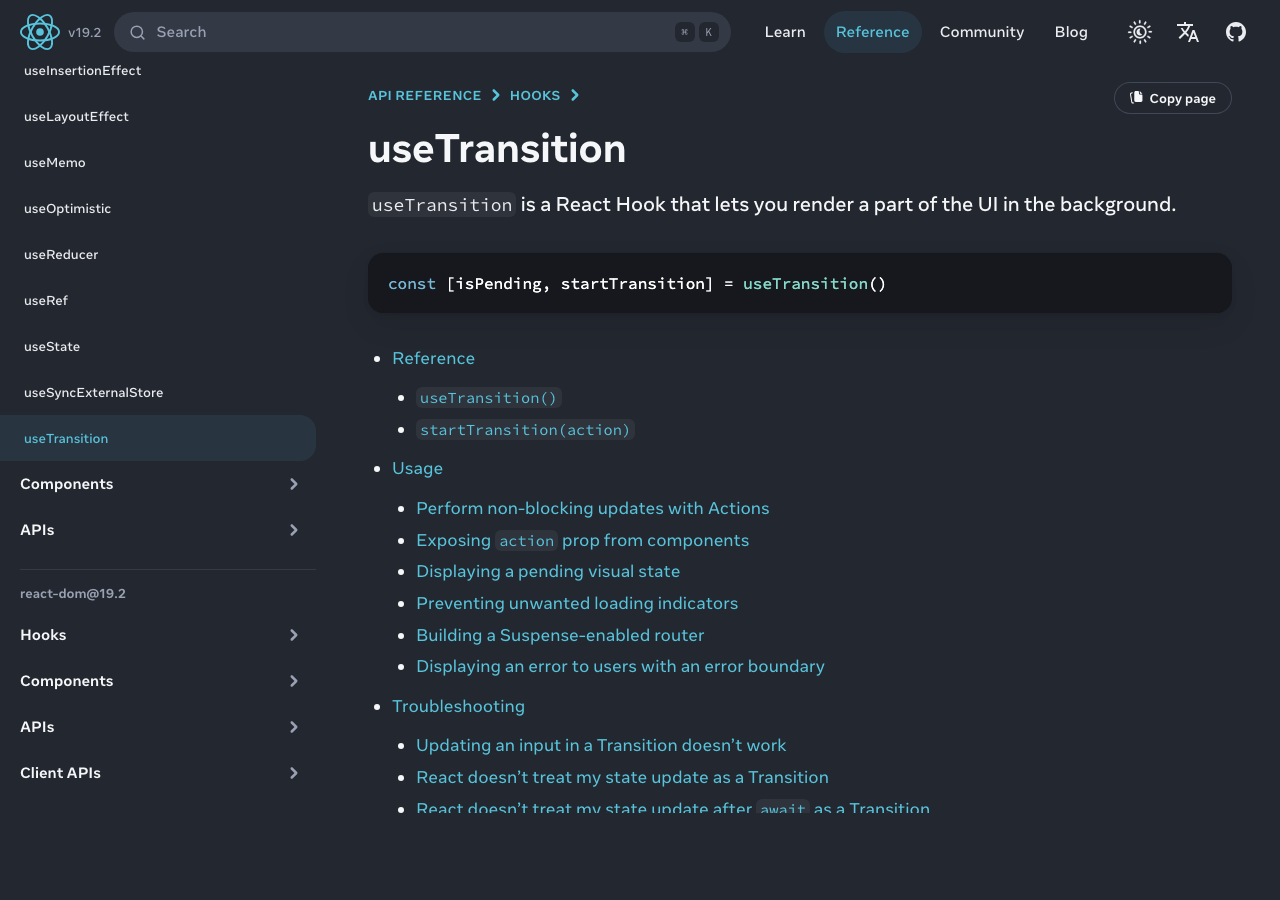
For a new React project in April 2026, the honest answer to should I still use Formik is no — pick React Hook Form for most client-heavy forms, TanStack Form when you need a state machine across fields, or React 19’s built-in form actions for simple server-driven submits. Formik isn’t broken; it’s frozen. Its single-Context, controlled-input architecture is exactly the pattern React 18’s concurrent renderer and React 19’s server actions were designed to move past. Keep Formik in brownfield code only when migration math is clearly negative.
Jump to
- The short answer: Formik isn’t broken, but it’s the wrong default in 2026
- What Formik actually is, architecturally — and why that mattered in 2019
- Why one Context plus controlled inputs means O(fields) renders per keystroke
- A 2026 maintenance audit, not a 2023 talking point
- The new decision space: RHF, TanStack Form, Conform, and React 19 form actions
- Decision framework: which form library to pick in 2026
- Greenfield vs brownfield: a migration cost rubric with LOC deltas
- Where Formik still wins — and the honest case for staying put
- The strongest counterargument: “Formik is good enough, and ‘frozen’ is a feature”
- React Native and RSC: two contexts where the case against Formik gets sharper
- Frequently asked questions
- Formik propagates one Context for the whole form, so an N-field form commits ~N fibers per keystroke; React Hook Form commits ~1 because state lives outside the render cycle.
- React 19 ships
useActionStateanduseFormStatusas core APIs, removing the need for any third-party library on simple submit-only forms. - Greenfield default: React Hook Form. TanStack Form for cross-field state machines. Conform or native actions for App Router and Remix.
- Brownfield default: stay on Formik until validation complexity, an RSC migration, or React Native input lag forces a port.
The short answer: Formik isn’t broken, but it’s the wrong default in 2026
Formik shipped in 2018 and was the right answer for years. The case against it isn’t quality — Formik 2.4 still works on the React 17/18 client surface it targets. The case is opportunity cost. Every form library that emerged after 2020 — React Hook Form, TanStack Form, Conform — was designed against newer React primitives, ships a smaller bundle, and produces fewer renders per keystroke. Meanwhile React itself absorbed the simple-form case with useActionState, leaving Formik defending a shrinking middle.
Frozen, not dead, is the honest framing. The repository still receives commits, mostly dependency bumps, and the package still installs cleanly on React 18. What’s missing is architectural work: there is no concurrent-mode story, no Server Components story, no first-class React Native optimisation. Formik’s GitHub repository has not posted a roadmap update aligning with React 18’s transitions API, let alone React 19’s actions, as of this writing.
What Formik actually is, architecturally — and why that mattered in 2019
Formik is a controlled-input form library built around one React Context. FormikContext holds values, errors, touched, and submission flags for the entire form. Every <Field>, <ErrorMessage>, and useFormikContext consumer subscribes to that Context. When you call setFieldValue, the Context value changes and every subscriber re-evaluates. In 2018, this was a sensible default: controlled inputs were the canonical React pattern, Context was the obvious state primitive, and most forms had ten fields, not thirty.
That tradeoff aged poorly. React added concurrent rendering and stable transitions, the form ecosystem standardised on uncontrolled inputs with refs, and bundlers got better at tree-shaking small libraries. The pattern Formik canonicalised — wrap a tree, broadcast every keystroke through Context — became the pattern its successors were designed against.
how Formik fit older React patterns goes into the specifics of this.
Purpose-built diagram for this article — The case against Formik for new React projects.
The diagram makes the propagation visible: a single keystroke calls setFieldValue, which mutates the Formik Context value at the top of the tree, and every Field, ErrorMessage, and useFormikContext consumer underneath it re-renders unless individually memoised. The render fan-out is proportional to the number of subscribers, not to the number of fields whose values actually changed.
Why one Context plus controlled inputs means O(fields) renders per keystroke
Most articles assert “Formik re-renders too much” without explaining why memoisation can’t fix it. The answer sits in React’s Context propagation rules. React’s useContext reference is explicit: any component reading a Context re-renders when the Context value’s identity changes. Formik creates a new values object on every keystroke (correctly — it’s tracking immutable state), so the Context identity changes every keystroke, so every consumer re-renders.
React.memo on <Field> doesn’t rescue this, because the Field reads the Context internally; memoisation only blocks re-renders driven by prop changes from the parent, not Context changes from inside the component. To get true per-field isolation in Formik you’d have to write your own selector layer with useSyncExternalStore — at which point you’ve reinvented the React Hook Form architecture.
More detail in single-Context render storms.
React Hook Form’s documentation describes the alternative directly: each input registers via register(), which attaches a ref and a per-field subscriber. Form state lives outside React’s render cycle in a mutable store; only the subscribers of the changed field commit. A 30-field form re-renders one fiber per keystroke, not thirty.

The animation captures the difference in React DevTools’ Profiler: Formik commits a fiber per Field on each character, while React Hook Form commits only the focused input. The gap widens with field count and validation complexity, and is the load-bearing reason RHF replaced Formik on perf-sensitive forms.
// Formik — Context update on every keystroke triggers a render of every <Field>
<Formik initialValues={initial} onSubmit={onSubmit}>
  {() => (
    <Form>
      <Field name="email" />
      <Field name="firstName" />
      {/* ...28 more <Field> components, each re-renders per keystroke */}
    </Form>
  )}
</Formik>

// React Hook Form — refs + per-field subscribers; only the focused input re-renders
const { register, handleSubmit } = useForm({ defaultValues: initial });
return (
  <form onSubmit={handleSubmit(onSubmit)}>
    <input {...register('email')} />
    <input {...register('firstName')} />
  </form>
);
A 2026 maintenance audit, not a 2023 talking point
The signal that matters is direction, not heartbeat. React Hook Form’s repository ships releases every few weeks; it has explicit React 19 support and a worked-out story for Server Components. Formik’s open-issue count has grown for three years; the average open-PR age is well over a year. There is no published roadmap entry for concurrent rendering, server actions, or RSC.
From the official docs.
If you need more context, a known sync-submit footgun covers the same ground.
Pulling up Formik’s official documentation in April 2026 reflects that freeze: the API surface still describes the withFormik HOC, FormikBag, and Yup as the canonical validator. The site has no migration guide for useActionState and no mention of React Server Components — the two largest changes to React forms in five years.
The new decision space: RHF, TanStack Form, Conform, and React 19 form actions
The 2026 form ecosystem is no longer a Formik-vs-RHF binary. Four credible options sit alongside Formik, each targeting a different shape of problem.
TanStack Form models forms as headless state machines with first-class field-level subscriptions, optimistic updates, and async validation choreography. It’s the right answer when your form has wizards, conditional fields, or interdependent validation that would otherwise turn a Formik useEffect chain into an unmaintainable knot.
A related write-up: RHF validation internals.
Conform is schema-first and built around progressive enhancement: the same form definition runs as a Server Action on submit and as a client validator before submit. In Next.js App Router or Remix, it’s the closest fit to the platform’s intended grain.
React 19’s useActionState and useFormStatus sit at the bottom of the stack: built into React, zero bundle cost, the right answer for forms whose only client behaviour is “submit and show pending state.” For a contact form, a sign-up form, or anything without cross-field logic, this is now the sensible default.
| Library | Render model | Min+gzip | React 19 actions | Release cadence | Best fit |
|---|---|---|---|---|---|
| Formik 2.4 | Single Context, controlled | ~13 kB | None | Sporadic patches | Existing Formik code |
| React Hook Form 7 | Refs + per-field subscribers | ~9 kB | Supported | Every few weeks | Most new client forms |
| TanStack Form 1 | Headless state machine | ~12 kB | Supported | Active | Cross-field state, wizards |
| Conform 1 | Schema-first, action-driven | ~8 kB | Native | Active | Next.js / Remix actions |
| React 19 actions | Native form + hooks | 0 kB | Native | Tied to React | Submit-only flows |
Bundle figures are min+gzip drawn from each library’s published artifact at the version listed; Formik’s number includes yup only when bundled together. Run your own bundle analyser before quoting numbers in an RFC — the actual figure depends heavily on import shape and tree-shaking config.
Decision framework: which form library to pick in 2026
The question collapses to one of five buckets. Walk down the list and stop at the first one that fits — the choices are deliberately ordered from “smallest commitment” to “largest.”
- Choose React 19 actions if the form has fewer than five fields, no client-side cross-field validation, and the only feedback the user needs is a pending state and a server-rendered error. Login, signup, contact, newsletter, and most CRUD detail pages fit here. Bundle cost is zero, the form works without JavaScript, and the API is part of React itself — there is nothing to upgrade later.
- Choose Conform if you are on Next.js App Router or Remix, you want one schema definition (Zod or Valibot) shared between server validation and progressive client enhancement, and your forms are submission-shaped rather than wizard-shaped. Conform is the cleanest fit when the framework already wants you on Server Actions.
- Choose React Hook Form if you have a client-heavy form with five-to-fifty fields, real-time validation feedback, and no special cross-field choreography. This is the default for the largest slice of real-world forms — admin panels, settings pages, multi-section profile editors. RHF’s per-field subscriber model gives you the perf wins without forcing a state-machine mental model on you.
- Choose TanStack Form if the form is a wizard, has interdependent fields whose validity depends on other fields’ values, requires async validation that has to be debounced and cancelled per field, or you’re building something closer to a domain-specific form engine than a single screen. The state-machine API costs you a learning curve but pays back when the form’s logic is the product.
- Stay on Formik if you already have it in production, the forms aren’t perf-bound, you’re not migrating to RSC, and no React Native input-lag complaint has surfaced. The “do nothing” option is legitimate and often correct — see the counterargument below.
One anti-pattern worth naming: do not pick a form library by GitHub stars or “what the team used last year.” Pick by render model and submission model. Those two axes determine whether your form will survive a 30-field admin screen and an RSC migration; everything else is taste.
Greenfield vs brownfield: a migration cost rubric with LOC deltas
For a new React project, the rubric is short. Use React Hook Form unless you can name a specific reason not to. Exceptions: pick TanStack Form if you have multi-step wizards or async cross-field validation, pick Conform if your routing is App Router or Remix and you want server-action-first submission, and use React 19’s built-in actions if the form has fewer than five fields and no client validation.
Brownfield is harder. The right model isn’t “should I migrate?” but “what’s the cost per field?” For a typical Formik form, mechanically porting a <Field name="email" component={EmailInput} /> plus Yup schema entry to register('email') plus Zod schema entry removes about 3-5 lines of Formik scaffolding (the Field wrapper, the ErrorMessage component, the touched-tracking) and adds about 1-2 lines of RHF (the register spread, the schema reference). Net delta per field: roughly -2 to -3 lines.
For more on this, see migrating off Formik to RHF.
That sounds like a clean win until you count the APIs without a 1:1 equivalent. FieldArray maps to RHF’s useFieldArray with a different mental model. useFormikContext consumers scattered across deep trees become useFormContext calls but lose the values-touched-errors triple in one read. Tests written against Formik internals — mocking FormikBag or asserting on formik.values — need rewriting wholesale.
The realistic trigger for a brownfield migration is one of three events: a user-visible perf complaint on a form with more than 20 fields, an RSC migration that wants forms to be progressive-enhancement-first, or a React Native build whose keystroke jank shows up in a profile. Until one fires, the migration is busy work.
Where Formik still wins — and the honest case for staying put
The strongest counterargument to migrating is institutional. A mature Formik codebase is debugged. It has tests, components, and engineers who know its sharp edges. The bundle savings of switching to RHF are real but small in absolute terms — roughly 4 kB per route — and dwarfed by your application code, your image budget, and your analytics tags. If your forms aren’t perf-bound and you aren’t adopting RSC, the rational move is to leave them alone.
Two scenarios genuinely favour staying. First: a small internal app with five 6-field forms and no growth plan. The rewrite has zero ROI. Second: a codebase whose Formik usage is wrapped in a custom abstraction. There the cost isn’t “port a form” — it’s “rewrite the abstraction,” and that math almost never works out.
A related write-up: the case for sticking with it.
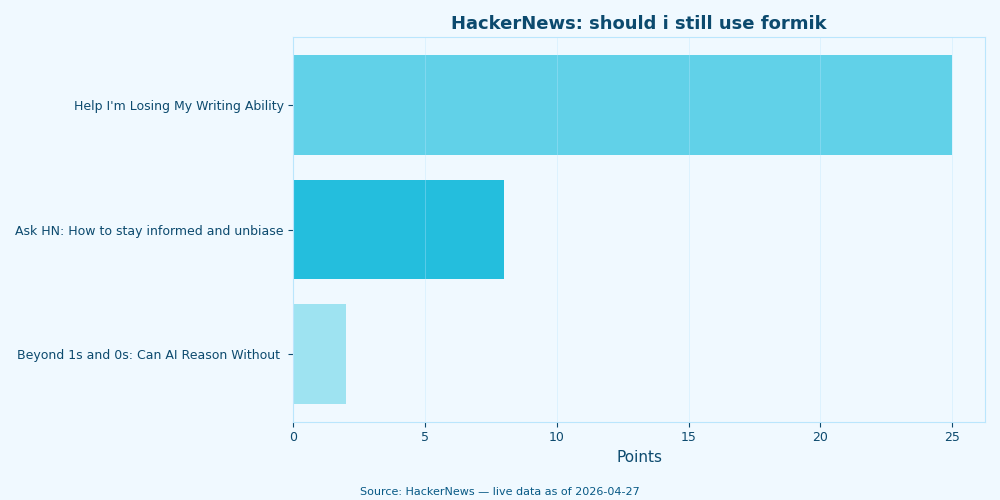
Live data: top HackerNews stories about “should i still use formik” by community points.
The HackerNews thread on the same question maps the practitioner consensus: most commenters describe Formik as “frozen, not dead,” recommend RHF for client-heavy forms, and reach for React 19 actions when the form is server-driven. Migration friction comes up in nearly every reply — confirming the brownfield case isn’t theoretical.
The strongest counterargument: “Formik is good enough, and ‘frozen’ is a feature”
The fairest version of the pro-Formik case in 2026 goes like this. A library that has stopped changing is a library you have stopped paying for. No churning APIs, no migration guides quietly dropping support for your patterns, no breaking changes hiding in a minor bump. Meanwhile React Hook Form ships every few weeks and TanStack Form is on its first major — both perfectly reasonable, but both also a maintenance tax. Formik’s stagnation, the argument runs, is a stable surface to build on. Real engineers value boring tools; Formik in 2026 is genuinely boring in the good sense, and most of the renders-per-keystroke discourse is benchmark theatre that never surfaces in real product UX.
This argument is partly right and worth taking seriously. The honest rebuttal is in three parts. First, “frozen” only equals “stable” when the surrounding platform is also frozen — and React isn’t. React 18’s concurrent renderer, React 19’s actions, and the broader RSC pivot have moved the platform under Formik’s feet, so what looks like stability from inside the Formik API is actually a growing impedance mismatch with the framework around it. Second, the perf gap is real on the workloads it shows up on: 20+ field forms, low-end Android, wizards with cross-field validation. The benchmark theatre critique is fair on a five-field login form and breaks down on a 40-field carrier-onboarding screen. Third, the migration tax on a maintained alternative is paid once; the architectural tax on staying compounds as the platform diverges further. The “do nothing” answer remains correct for unchanging codebases on a stable React version, which is exactly what the brownfield section above tells you to do — but mistaking that for a general endorsement of Formik on greenfield work is the trap. Boring is good when the surrounding system is boring with you.
React Native and RSC: two contexts where the case against Formik gets sharper
React Native is where Formik’s render model becomes a user-visible problem. Every React render in RN crosses the JS-native bridge for affected views. A 30-field Formik form on a low-end Android device produces measurable input lag because every keystroke commits 30 fibers and patches 30 native views. RHF’s per-field subscriber model collapses that to one. React Native’s performance guide calls out re-render fan-out as a leading source of input jank, which makes the RHF migration straightforwardly worth doing on mobile forms.
React Server Components is where Formik becomes architecturally incompatible, not just slow. A Formik form is, by definition, a client component — it owns state, runs validation, and orchestrates submission in the browser. React 19’s preferred pattern is the opposite: a Server Action handles submission, the server is the source of truth for validation, and the client adds optimistic state via useFormStatus. The form works without JavaScript on the happy path.
If you need more context, recent RN platform shifts covers the same ground.
// React 19 — no Formik, no RHF, just a native form + Server Action
async function createUser(formData) {
  'use server';
  const email = formData.get('email');
  // server-side validation + persistence
  await db.users.create({ data: { email } });
}

export default function SignupForm() {
  return (
    <form action={createUser}>
      <input name="email" type="email" required />
      <SubmitButton />
    </form>
  );
}

function SubmitButton() {
  const { pending } = useFormStatus();
  return <button disabled={pending}>{pending ? 'Submitting…' : 'Sign up'}</button>;
}
Dropping formik + yup in favour of react-hook-form + zod typically nets a low-double-digit kB reduction in the form bundle, before any tree-shaking. On a server-rendered route, that translates directly into a smaller hydration payload.
The decision is simpler than the discourse suggests. New React project? React Hook Form by default, TanStack Form for state-machine-shaped forms, Conform or native React 19 actions for server-action-first apps. Formik working in production with no perf complaints? Leave it. The migration is busy work until validation complexity, RSC adoption, or React Native input lag forces your hand. The wrong move on either side is treating should I still use Formik as one question — it’s two: should I pick it today (no), and should I rip it out (only when something concrete pays for the port).
Frequently asked questions
Should I still use Formik in 2026?
For a new project, no — pick React Hook Form for most client forms, TanStack Form for wizards or cross-field state machines, Conform or React 19’s native form actions for App Router/Remix submit flows. Formik is frozen rather than dead and is still safe to keep in existing production code, but its single-Context render model and lack of a Server Components story make it the wrong default on greenfield work.
Is Formik abandoned or just maintained slowly?
Frozen is more accurate than abandoned. The repository still receives dependency-bump commits and the package installs cleanly on React 18, but there is no published roadmap aligning Formik with React 18’s transitions, React 19’s useActionState/useFormStatus, or React Server Components. Average open-PR age is well over a year, and no architectural work has shipped to address concurrent rendering or RSC.
When is it worth migrating an existing Formik codebase to React Hook Form?
When one of three concrete triggers fires: a user-visible perf complaint on a form with more than ~20 fields, an RSC or App Router migration that needs progressive-enhancement-first forms, or React Native input lag that shows up in a profile. Absent those triggers, the institutional cost of porting (rewriting tests, replacing FieldArray and useFormikContext patterns, retraining the team) usually outweighs the ~4 kB-per-route bundle saving.
References
- Formik GitHub repository — release history, open issues, and commit cadence used in the 2026 maintenance audit.
- Formik on npm — published versions and download trend, primary source for the “last release 2.4.x” datapoint.
- React documentation:
useContext— the official propagation rule that explains why Formik’s per-keystroke Context update fans out to every consumer. - React documentation:
useActionStateanduseFormStatus— the React 19 form primitives that subsume the simple-submit case. - React Hook Form documentation — official description of the refs + per-field subscriber model used as the architectural contrast.
- TanStack Form documentation and Conform documentation — primary references for the two non-RHF alternatives in the comparison matrix.
- React Native performance guide — official guidance on render fan-out as a source of input jank, cited in the RN section.