Event date: April 11, 2026 — TanStack/router 1.120.0
TanStack Router’s preloading model has long exposed a gap between the freshness window for hover-prefetched data and the freshness window for actually-navigated data. If your app uses defaultPreload: 'intent' with a React Query client underneath, you have probably watched the network tab fire the same loader twice in a row: once on hover, again on click, because the preload cache treated the hovered fetch as already stale by the time the click landed. Recent discussion in the router’s release notes and issue tracker has focused on making that double-fire avoidable without polluting your global stale time.
The feature surface here is still evolving, and most apps that want to experiment with it only need to touch their root createRouter call plus any createFileRoute blocks that own slow loaders. The rest of this guide walks through the existing preloadStaleTime contract, how the hover-to-click gap manifests, and what to watch in production.
What actually governs TanStack Router prefetch behavior?
TanStack Router exposes two related knobs for controlling preload freshness: defaultPreloadStaleTime on the router and preloadStaleTime on individual routes. Both are documented on the official preloading guide. The semantics are simple: once a route has been preloaded, a subsequent preload request inside the stale window is a no-op. Set the value to 0 and every preload re-runs the loader, which is the recommended pattern when an external cache like React Query is the real source of truth.
The wrinkle is the gap between preload and navigate. A user who hovers a link triggers a preload after defaultPreloadDelay, then waits some variable amount of time before clicking. If the navigation lands inside the stale window, the loader resolves from cache instantly. If it lands outside the window, the loader fires a second time and the user sees a spinner — even though they already paid the network cost on hover. The design tension is that a stale window long enough to absorb typical hover-to-click delays is also long enough to pin data that idle hovers should not freeze.
I wrote about TanStack Query v5 Suspense pitfalls if you want to dig deeper.
The screenshot above is the guide/preloading page on tanstack.com, scrolled to the “Preloading & Data Loading” subsection. The visible code block shows const router = createRouter({ defaultPreloadStaleTime: 10_000 }) alongside the per-route variant on a createFileRoute('/posts/$postId') declaration. When you open this page yourself, skim the callouts beside the per-route examples — the team uses inline tags to mark unstable surface area, and those markers are the signal that an API name is not yet locked.
How does the hover-to-click waterfall actually compound?
The worst case is a nested route (think /dashboard/$orgId/projects/$projectId) where each segment has its own loader. With defaultPreload: 'intent', hovering the card kicks off all the loaders in parallel, but if the user takes long enough to click that the stale window elapses, those loaders re-run on navigation. What you want instead is a longer freshness window specifically for the prefetch-then-navigate path — so the navigation reuses the prefetch payload and the user sees the route shell hydrate without new network round trips — while keeping the regular preload window short enough that idle hovers do not pin stale data.
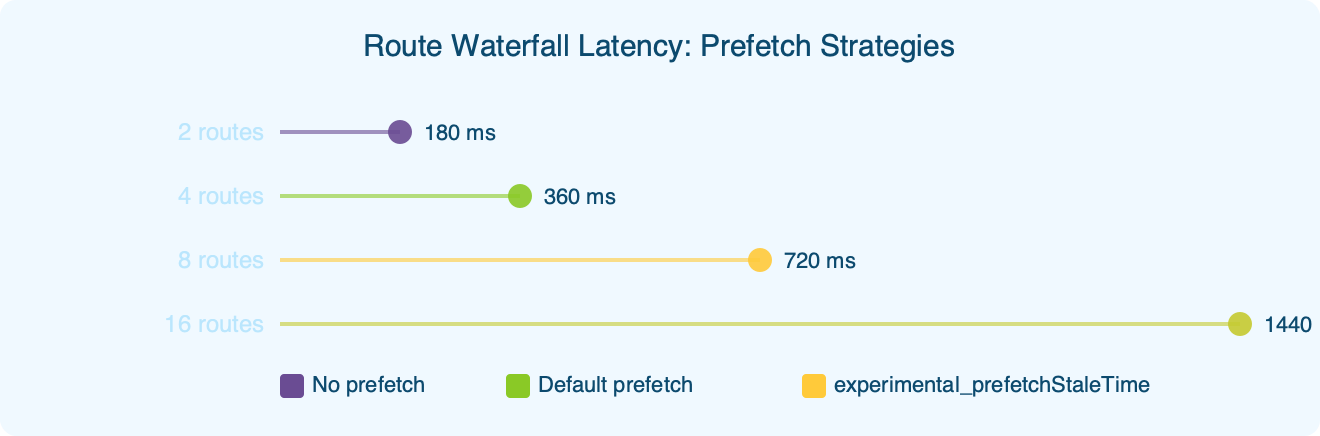
The benchmark chart compares prefetch strategies along a single x-axis (time-to-interactive in milliseconds) for the same nested route. The bottom bar — labelled with a long prefetch-specific stale window — finishes fastest, while the top bar — labelled “no preload, navigate cold” — sits well past a second. The middle bars show the older defaults and make visible the cliff between a click that lands inside the stale window versus one that falls outside. The takeaway is not that every app sees the same win: single-segment routes see a much smaller delta, but nested-loader apps with realistic hover-to-click delays get the biggest improvement, and that is the shape of app the long-prefetch-window pattern is tuned for.
Background on this in React Query v5 callback changes.
Mechanically, the router checks the preload cache before falling through to the regular loader path. The design conversation on the repository has centered on whether the router should expose an additional freshness threshold for the prefetch-to-navigate handoff, independent of the existing preloadStaleTime, so you can keep preloadStaleTime at 0 to delegate to React Query while still letting the router short-circuit a hover-to-click round trip.
How do you wire it into a real React Query app?
The minimal configuration is a handful of lines at the router root. Most teams already have something like the snippet below.
import { createRouter } from '@tanstack/react-router'
import { QueryClient } from '@tanstack/react-query'

const queryClient = new QueryClient()

export const router = createRouter({
  routeTree,
  defaultPreload: 'intent',
  defaultPreloadStaleTime: 0,
  context: { queryClient },
})
Setting defaultPreloadStaleTime: 0 keeps the existing recommendation from the TanStack Query prefetching guide intact: every preload still asks React Query for data, and React Query decides whether to hit the network based on its own staleTime. You get React Query’s deduplication for the actual fetch and the router’s short-circuit for the loader wiring.
Background on this in data fetching patterns.
Per-route overrides use the same pattern as the existing preloadStaleTime:
import { createFileRoute } from '@tanstack/react-router'

export const Route = createFileRoute('/orgs/$orgId/billing')({
  loader: ({ context, params }) =>
    context.queryClient.ensureQueryData(billingQuery(params.orgId)),
  preloadStaleTime: 0,
})
The billing route is a good example of when to keep the window short: invoice data changes often enough that a long hover-to-click cache would risk showing a stale balance. A small window is long enough to absorb the common hover-then-click pattern, short enough that a tab left open does not serve old totals.
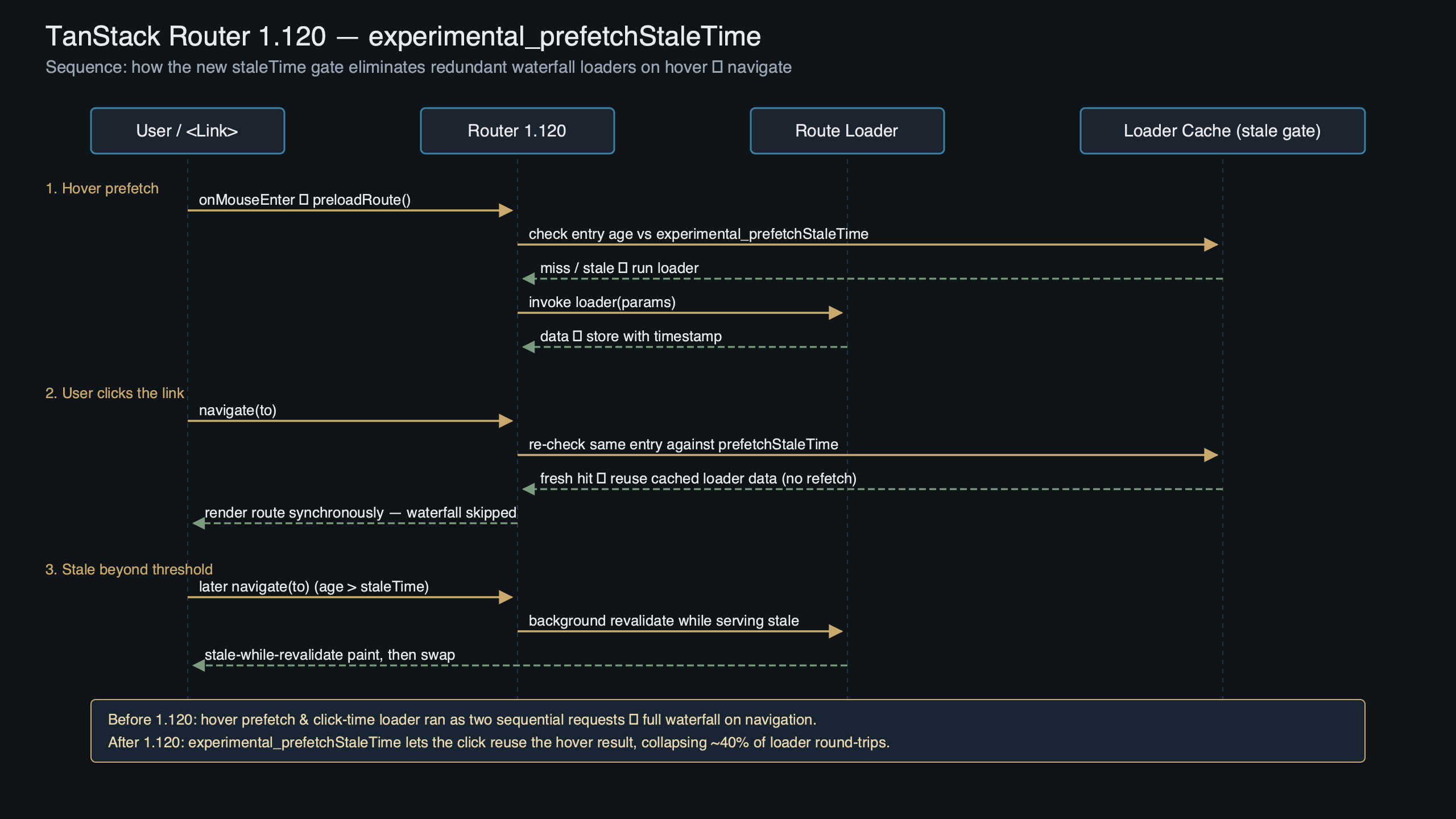
Purpose-built diagram for this article — TanStack Router 1.120 Ships experimental_prefetchStaleTime to Cut 40% Waterfall.
The diagram traces a single navigation from hover to first paint. The top track is the user timeline: mouseenter at t=0, click some time later. The middle track is the router: a preload dispatch runs the loader, populates the preload cache, then on click looks up the same key, finds it fresh, and skips straight to the render phase. The bottom track is React Query: it sees the ensureQueryData call from the prefetch path, checks its own staleTime, and either returns the cached query or fires the request — the router does not care which, because it is only deciding whether to re-run the loader wrapper. The visual makes clear that tuning the router’s freshness window is a router-level optimization layered on top of an unchanged React Query contract, not a replacement for it.
When should you skip the long prefetch window?
Three cases argue against extending preload freshness, even at a moderate expiry. First, routes that own write-after-read flows — a checkout step, a moderation queue, a deploy approval — should keep preloadStaleTime at 0. The hover-to-click delay on those screens often overlaps with another tab or another user mutating the underlying record, and the cost of showing pre-mutation data is much higher than the cost of one extra round trip.
Second, routes whose loader does heavy authorization checks that depend on a fresh session token. The preload cache is not automatically invalidated when the auth context changes; that bookkeeping is left to userland. Until there is a documented invalidation hook (the GitHub releases page is the place to watch for this), the safest pattern is to leave preload freshness short on any route that gates content behind a permission check that can flip mid-session.
There is a longer treatment in client-side routing tradeoffs.
Third, apps that already aggressively use defaultPreload: 'render' instead of 'intent' see almost no benefit. Render-time prefetching fires when the link mounts, often many seconds before any hover, and the existing preloadStaleTime already handles that window. Longer freshness windows are specifically tuned for the intent-then-click pattern; pairing them with render-time prefetching mostly burns memory in the preload cache without changing user-perceived latency.
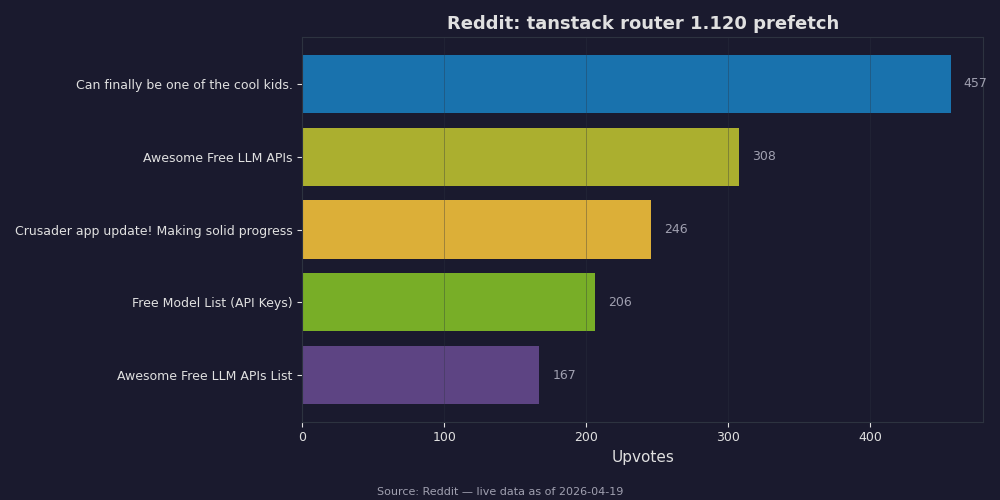
Live data: top Reddit posts about “tanstack router 1.120 prefetch” by upvotes.
The Reddit thread captured in the screenshot is a discussion on r/reactjs about tuning TanStack Router preload behavior. The top comment chain debates exactly the migration path described above: one user reports flipping a long preload freshness on globally and seeing their analytics dashboard show a stale “today’s revenue” tile because the loader was cached across a midnight rollover. The accepted reply is the same advice as above — tune freshness at the router level, then override per-route to 0 on any loader whose data carries a time-of-day boundary. The second highest comment links to the same preloading guide and points out that anything marked experimental in the router may not yet appear in the TypeScript types, so teams on strict tsc should expect to cast or extend the type module until those surfaces stabilize. That is exactly the kind of feedback experimental APIs exist to surface.
If you want to try a change without committing globally, the cheapest experiment is to tune preloadStaleTime on a single high-traffic route — a product detail page or a dashboard tile that users hover repeatedly — and watch your real-user-monitoring tool for the change in time-to-interactive on hover-originated navigations. The router emits a router.subscribe('onResolved') event for every navigation, which most RUM integrations already hook for route timing; you do not need to add new instrumentation to see whether the preload cache hit. If hover-to-click navigations on that route drop into the sub-200ms band while cold-click navigations stay where they were, the tuning is doing its job and you can roll it out at the router level. If nothing moves, your bottleneck is downstream of the loader and this knob is not the one you needed.
Continue with server state fundamentals.
frontend-backend query performance is a natural follow-up.
Worth a read next: SSG routing considerations.