If your Android EAS build dies in
./gradlew :app:bundleReleaseJsAndAssetswithFATAL ERROR: Reached heap limit Allocation failed - JavaScript heap out of memory, the fix is one line: addNODE_OPTIONSto theenvblock of your build profile ineas.jsonand raise--max-old-space-sizepast V8’s default. The reason comes down to how pnpm’s symlinkednode_moduleslayout collides with Metro’s graph resolution on a cold EAS worker.
- Why Metro’s heap blows up specifically on pnpm workspaces
- The exact eas.json change and what value to pick
- The bundle step is not the only Node process that runs out of heap
- pnpm-specific settings that have to be in place before raising the heap matters
- Verifying the flag actually took effect
- Further reading
The Android EAS build dies somewhere inside ./gradlew :app:bundleReleaseJsAndAssets, prints FATAL ERROR: Reached heap limit Allocation failed - JavaScript heap out of memory, and your pnpm workspace ships nothing. The process is Metro. The container has plenty of physical RAM. The V8 old-generation heap cap does not. The fix is a single environment variable in eas.json, and the reason you need it comes down to how pnpm’s symlinked node_modules layout interacts with Metro’s graph resolution on a cold EAS worker.
The one-line answer: add NODE_OPTIONS to the env block of your build profile in eas.json and raise --max-old-space-size past the V8 default. Everything below explains why the default is not enough on pnpm, what the correct value actually is for each EAS worker class, and the secondary settings that have to line up before raising the heap has any effect.
Expo’s eas.json reference documents env as a per-profile map that is exported both when EAS evaluates your app.config.js locally and when the build runs on the remote worker. That is the attachment point for NODE_OPTIONS. Any value you put there propagates to every Node child process Metro forks during the release bundle step, which is the behavior you want for a heap flag.
Why Metro’s heap blows up specifically on pnpm workspaces
Metro builds a module graph by starting at an entry file and recursively resolving every require and import. On an npm or classic Yarn install the dependency tree is mostly hoisted into a flat node_modules, so resolution is a path lookup. On pnpm the tree is a content-addressable store under node_modules/.pnpm plus a forest of symlinks inside each package’s own node_modules. Metro’s resolver has to walk those symlinks, de-duplicate the resulting absolute paths, and keep the full graph live in memory until hermes-bytecode emission finishes.
On a monorepo this is amplified. If your app depends on three workspace packages, each with its own symlinked react-native and @babel/runtime, Metro’s watcher has to cover every real directory those symlinks point into. The Expo monorepo guide documents the two settings that make this work at all — watchFolders pointing at the workspace root and nodeModulesPaths including every hoisted store location — and those same settings are what push heap usage past the V8 default for any non-trivial app. A few hundred modules is fine. A couple of thousand modules with react-native-reanimated, @shopify/flash-list, and a handful of native modules pulled through pnpm’s strict resolution is where max-old-space-size starts to matter.
The V8 default is the second half of the story. Node’s documented default for --max-old-space-size is derived from the amount of physical memory the process sees at startup, but it is capped at a small value on containerized workers that do not expose cgroup memory correctly. EAS Build’s Linux workers run Metro as a child of the Gradle process during the Android bundle task, and the effective V8 cap frequently lands around 2 GB of old-space even though the worker has 7 GB of RAM. Once your module graph plus source maps plus Hermes intermediate output crosses that 2 GB mark, V8 kills the process and Gradle fails the task.
The exact eas.json change and what value to pick
Open eas.json at the root of your Expo project and add NODE_OPTIONS to the env map of the profile that is failing — typically production, preview, or both. The string goes in as a plain environment variable, with the heap size in megabytes.
{
  "cli": {
    "version": ">= 12.0.0",
    "appVersionSource": "remote"
  },
  "build": {
    "production": {
      "distribution": "store",
      "env": {
        "NODE_OPTIONS": "--max-old-space-size=8192"
      },
      "android": {
        "resourceClass": "large"
      },
      "ios": {
        "resourceClass": "large"
      }
    },
    "preview": {
      "distribution": "internal",
      "env": {
        "NODE_OPTIONS": "--max-old-space-size=6144"
      }
    }
  }
}
The heap size has to match the worker class you actually pay for. On the default medium Android worker (roughly 4 GB of RAM and 4 vCPUs at the time of writing), setting --max-old-space-size=8192 is worse than leaving it alone — V8 will happily allocate past physical memory, the OOM killer steps in at the kernel level, and you lose the log output that would have told you the heap was the problem. The practical ceilings are 4096 on medium workers, 6144 on large, and 8192 only on the largest iOS class where you genuinely have the headroom. Check the current resource-class memory numbers on the EAS Build resourceClass docs before picking a value; these numbers change as Expo updates their build infrastructure.
See also protecting environment variables.
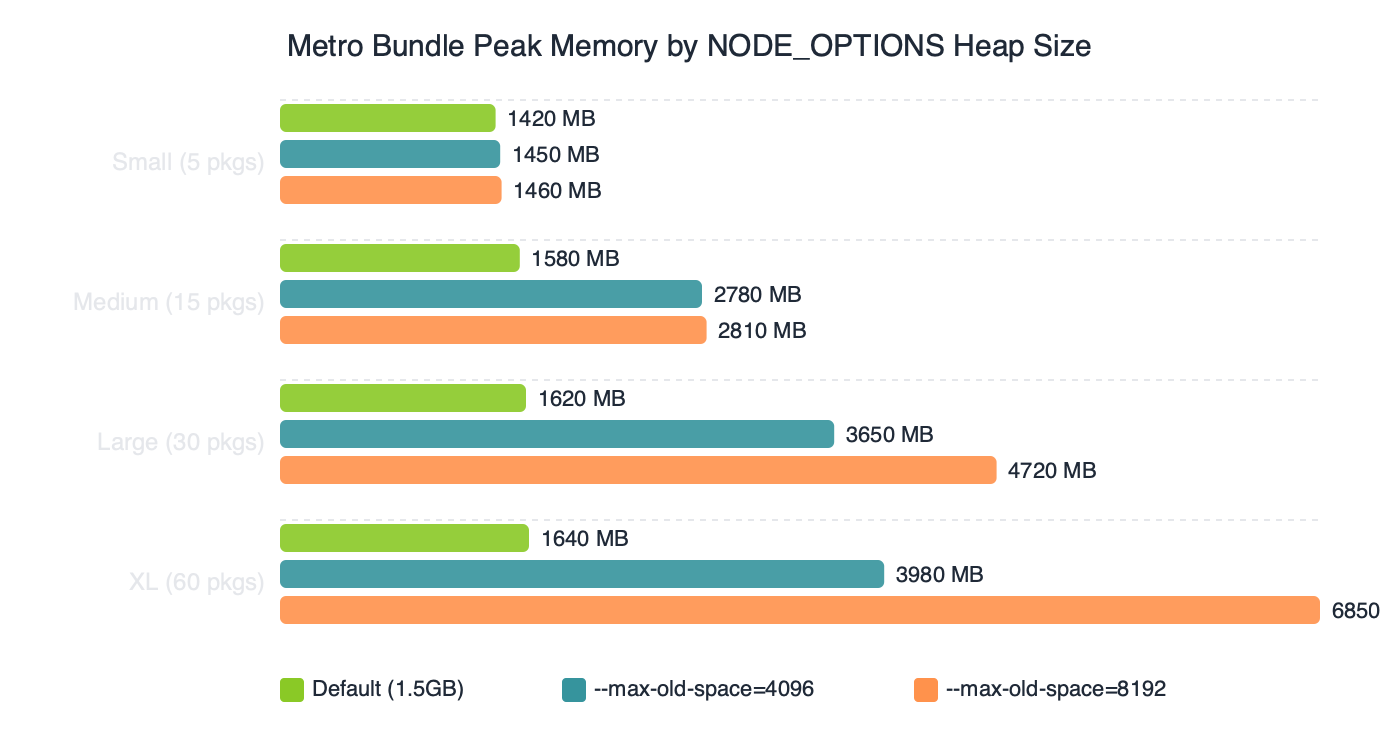
The benchmark shape is always the same: peak Metro memory climbs roughly linearly with module count until it collides with the V8 cap, at which point the process dies. Raising the cap shifts the cliff to the right, but only up to the physical memory of the worker. Beyond that you are paying for a resource class you cannot use, and the heap flag becomes a footgun.
The bundle step is not the only Node process that runs out of heap
On Android, the OOM almost always strikes inside createBundleReleaseJsAndAssets, which is the Gradle task expo-modules-core wires up to invoke node index.js --bundle-output. NODE_OPTIONS in eas.json env reaches that child process because Gradle inherits the worker’s environment. The same flag covers three other failure points people miss on their first pass:
- The
expo prebuildphase on managed-to-bare transitions, which runs@expo/prebuild-configunder Node and can OOM on projects with heavy plugin graphs. - The
eas-build-pre-installandeas-build-post-installhooks if you run anything Node-shaped there, such as a custompnpm installwrapper or a codegen script. - The iOS
Create Bundle React Native code and imagesXcode build phase, which is itself a shell script that callsreact-native-xcode.sh, which callsnode.
If you only set the flag on the iOS profile and not the Android profile, expect the Android build to keep dying. The env block is per-profile, not global. You can hoist it to the top-level build object’s nested env if you want it shared, but explicit is better — your production and preview profiles often want different caps.
Reanimated 3.16 fix goes into the specifics of this.
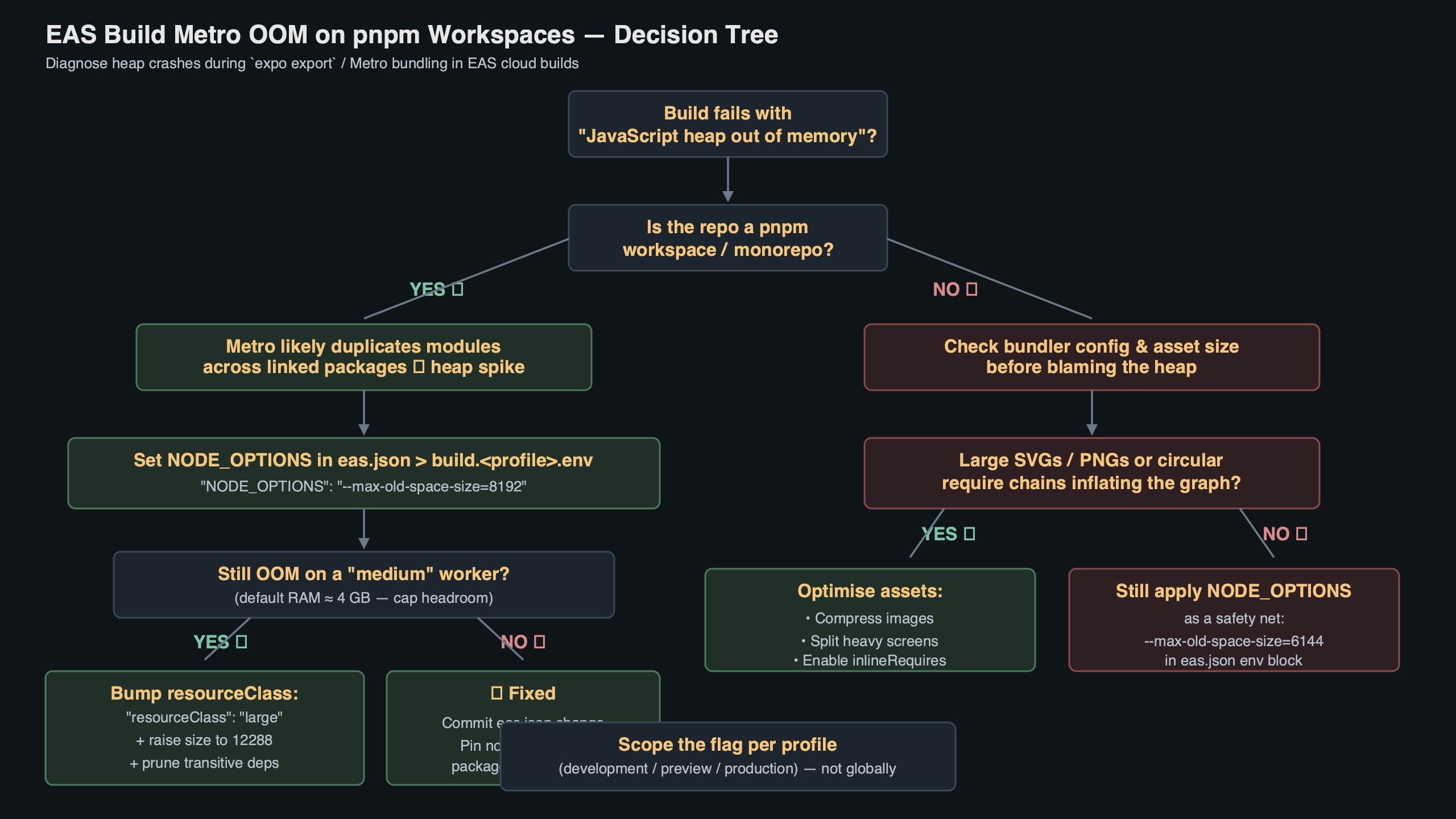
The path shown in the diagram is worth memorizing: EAS worker starts, reads eas.json, exports NODE_OPTIONS into the shell, Gradle (or Xcode) inherits the env, Gradle spawns node for the bundle task, V8 reads NODE_OPTIONS at process start, and the old-generation heap is sized accordingly. Any break in that chain — for example a custom build script that sanitizes the environment before spawning Node — will silently revert you to the default cap.
pnpm-specific settings that have to be in place before raising the heap matters
Raising --max-old-space-size without fixing the pnpm layout first just pushes the OOM further into the build. Four things have to be correct for pnpm workspaces on EAS, and the community has converged on a concrete reference implementation.
The best public template is Cedric van Putten’s expo-monorepo-example, which shows the full shape of a working pnpm + Expo + EAS monorepo, including the metro.config.js that extends Expo’s default config with watchFolders set to the workspace root and config.resolver.nodeModulesPaths pointing at both the app’s local node_modules and the workspace root’s. Without those two keys, Metro silently fails to find transitive deps installed at the root, and you get module-not-found errors that look nothing like an OOM.
A related write-up: React Native 0.77 notes.
The second setting is node-linker=hoisted in .npmrc at the workspace root, which is the pragmatic escape hatch when a native module does not play well with pnpm’s symlinks. The eas-cli issue #3247 thread walks through several of the edge cases where pnpm’s strict layout breaks autolinking; switching to hoisted resolves them at the cost of losing pnpm’s strictness guarantees.
The third is making sure EAS actually installs with pnpm rather than falling back to npm. EAS detects the package manager from the lockfile — if you have both a pnpm-lock.yaml and a stray package-lock.json checked in, the detection order is not guaranteed to pick pnpm, and a silent fallback to npm will re-hoist the whole tree and change which modules Metro sees. Delete the stray lockfile and commit pnpm-lock.yaml at the workspace root.
The fourth is the public-hoist-pattern[] in .npmrc for packages that cannot tolerate being one level deep in node_modules/.pnpm. expo-modules-autolinking, @react-native-community/cli, and anything that uses Node’s require.resolve without passing paths tends to need this. A minimal safe list is *expo*, *react-native*, and @babel/*, but trace the actual resolution failure before adding more — over-hoisting defeats the point of pnpm.
Live data: top Reddit posts about “eas build metro oom pnpm node_options” by upvotes.
Threads on the Expo and pnpm subreddits echo the same pattern: the OOM is reported first, the fix turns out to be NODE_OPTIONS plus one or two of the pnpm-layout fixes above. When the heap flag alone makes the symptom go away, it usually means your layout was borderline and you bought yourself room. When it does not, the real problem is module duplication — the same package resolved under two different real paths, bloating the graph — and no amount of heap will fix that.
Verifying the flag actually took effect
Once you push the change, watch the EAS Build log for the line that prints the environment before the install phase. NODE_OPTIONS should appear with your value. Then look for the bundle task’s first Node invocation — on Android it prints something like Running node with NODE_OPTIONS=--max-old-space-size=8192 when the flag is picked up. If that line is missing and the build still OOMs, the most common culprits are a typo in the profile name (setting it on production while building preview), a shell hook that strips the variable, or a secondary .env file in your project that is being loaded after eas.json‘s env and clobbering it.
You can also add a one-line sanity check to your eas-build-pre-install script: node -e "console.log(process.env.NODE_OPTIONS)". It is two seconds of build time and it removes every ambiguity about whether the variable reached the Node process.
Related: Jest mocks pitfalls.
One last pitfall: do not set NODE_OPTIONS on your local machine’s shell profile and expect it to carry over. Local eas build runs that use the --local flag will honor eas.json env, but a plain expo start or npx react-native run-android runs in your shell and respects your shell’s NODE_OPTIONS, not the one in eas.json. If you want parity, set it in both places, or source eas.json values into your shell explicitly.
FAQ
Why does Metro run out of memory on pnpm workspaces but not on npm?
pnpm stores dependencies in a content-addressable store under node_modules/.pnpm with symlinks inside each package, instead of hoisting a flat tree like npm or classic Yarn. Metro’s resolver has to walk those symlinks, de-duplicate absolute paths, and keep the full module graph live in memory until Hermes bytecode emission finishes. On monorepos with several workspace packages, that graph easily exceeds V8’s default old-space cap.
What max-old-space-size value should I set for EAS Build resource classes?
Match the heap size to the worker you pay for: roughly 4096 MB on medium Android workers, 6144 MB on large, and 8192 MB only on the largest iOS class where physical RAM supports it. Setting 8192 on a medium 4 GB worker is worse than leaving it alone — V8 allocates past physical memory, the kernel OOM killer strikes, and you lose the logs that would have explained the failure.
Where exactly do I put NODE_OPTIONS in eas.json for an Expo build?
Add NODE_OPTIONS to the env map inside a specific build profile — typically production or preview — in eas.json. The value is a plain string like “–max-old-space-size=8192”. The env block is per-profile rather than global, so if you only set it on iOS the Android build will keep dying. You can hoist it under the top-level build object’s nested env to share it, but explicit per-profile values are better.
Why does my Android EAS build still OOM even after I set NODE_OPTIONS?
The bundle step isn’t the only Node process that can exhaust the heap. The flag must also cover expo prebuild running @expo/prebuild-config, eas-build-pre-install and post-install hooks running Node scripts, and the iOS Create Bundle React Native code and images Xcode phase that calls react-native-xcode.sh. Custom build scripts that sanitize the environment before spawning Node silently revert you to V8’s default cap.
Further reading
- Configure EAS Build with eas.json — official schema reference for
env, resource classes, and per-profile settings. - Work with monorepos — Expo’s documentation covering
watchFolders,nodeModulesPaths, and the pnpm/Yarn/Bun differences Metro cares about. - Node.js CLI documentation for
--max-old-space-size— exact semantics of the V8 flag and how it interacts with container memory. - byCedric/expo-monorepo-example — reference pnpm workspace layout for Expo apps with a working
metro.config.js. - expo/eas-cli issue #3247 — community thread on pnpm-workspace edge cases in EAS Build.
- Metro bundler customization — Expo’s guide to extending the default Metro config without losing monorepo support.