In the rapidly evolving ecosystem of mobile development, staying updated with React Native News is crucial for building robust, scalable applications. At the heart of almost every successful mobile app lies a solid navigation strategy. Whether you are building a complex e-commerce platform, a social media feed, or a detailed recipe application, the way users move through your content defines their experience. Today, we are diving deep into React Navigation News, exploring the latest architectural patterns in version 6 (and looking ahead to v7), integrating state management, and ensuring type safety across your React Native projects.
Navigation is no longer just about pushing and popping screens. It is about deep linking, seamless animations, preserving state during transitions, and handling complex nested hierarchies. With the rise of tools highlighted in Expo News, such as Expo Router, the line between web and native navigation is blurring. However, the imperative API of React Navigation remains the industry standard for granular control. In this comprehensive guide, we will explore how to construct a “MasterChef” level navigation architecture, touching upon integrations with Redux News, performance optimizations, and the latest best practices.
Section 1: The Foundation – Type-Safe Navigation Strategies
One of the most significant shifts in React News over the last few years has been the overwhelming adoption of TypeScript. When dealing with navigation, type safety is not a luxury; it is a necessity. Without it, passing parameters between screens (e.g., passing a recipeId to a Details screen) becomes a source of runtime errors that are hard to debug.
Modern React Navigation v6 puts TypeScript front and center. Instead of relying on loose string literals for route names, we define a comprehensive param list. This ensures that if you try to navigate to a screen that doesn’t exist or forget to pass a required parameter, your build will fail before you even run the app. This aligns with the broader trends seen in React Native News regarding developer experience (DX) and code stability.
Let’s look at how to properly structure a stack navigator with full type safety. This setup is essential whether you are using NativeBase News components or custom UI built with Tamagui News principles.
import React from 'react';
import { NavigationContainer } from '@react-navigation/native';
import { createNativeStackNavigator } from '@react-navigation/native-stack';
import { NativeStackScreenProps } from '@react-navigation/native-stack';

// 1. Define the Parameter List
// undefined means the route has no params
export type RootStackParamList = {
  Home: undefined;
  CategoryList: { categoryId: string; title: string };
  RecipeDetail: { recipeId: string; source: 'api' | 'local' };
  Settings: undefined;
};

// 2. Create the Stack
const Stack = createNativeStackNavigator<RootStackParamList>();

// 3. Define Props for a specific screen to get auto-completion
type RecipeDetailProps = NativeStackScreenProps<RootStackParamList, 'RecipeDetail'>;

const RecipeDetailScreen = ({ route, navigation }: RecipeDetailProps) => {
  // TypeScript knows that recipeId is a string
  const { recipeId, source } = route.params;

  return (
    // Your UI Components here
    <></>
  );
};

export default function AppNavigator() {
  return (
    <NavigationContainer>
      <Stack.Navigator initialRouteName="Home">
        <Stack.Screen
          name="Home"
          component={HomeScreen}
          options={{ title: 'Dashboard' }}
        />
        <Stack.Screen name="CategoryList" component={CategoryListScreen} />
        <Stack.Screen name="RecipeDetail" component={RecipeDetailScreen} />
      </Stack.Navigator>
    </NavigationContainer>
  );
}

// Mock components for the example
const HomeScreen = () => <></>;
const CategoryListScreen = () => <></>;
By implementing this pattern, you ensure that your navigation logic is robust. If you attempt to push to RecipeDetail without a source, TypeScript will alert you immediately. This level of strictness is vital when your app scales to include dozens of screens, a common scenario discussed in React Native Elements News and architecture forums.
Section 2: Complex Nested Navigation and State Management
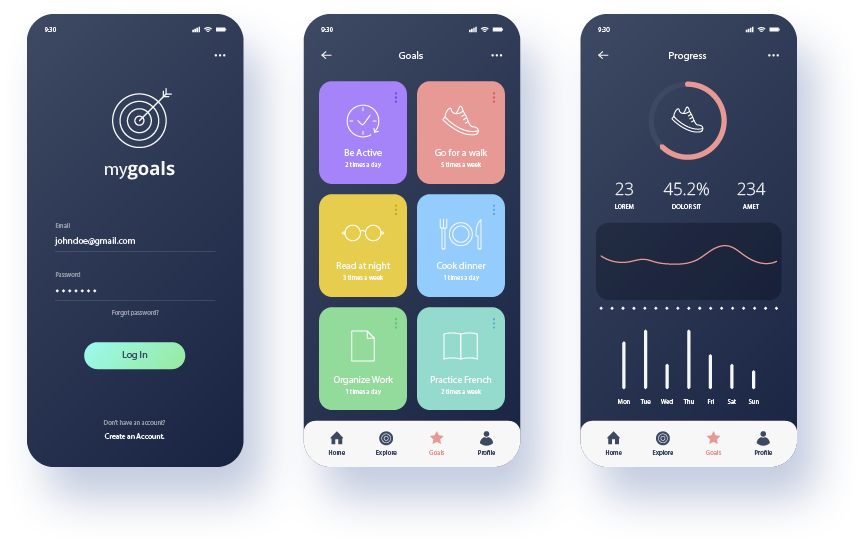
Real-world applications rarely consist of a single stack. A typical app structure involves a Bottom Tab Navigator (for main sections like Feed, Search, Favorites, Profile) where each tab holds its own Stack Navigator. Managing this hierarchy requires careful planning, especially when integrating global state tools highlighted in Redux News, Zustand News, or Recoil News.
Integrating Redux Toolkit and Persistence
When navigating between tabs, you often want to preserve the state of a specific screen or share data across the app. For instance, if a user marks a recipe as a “favorite” in the Details screen (inside the Home Stack), that change should immediately reflect in the Favorites Tab. This is where Redux Toolkit and Redux Persist shine. While MobX News and Jotai News offer excellent alternatives, Redux remains a powerhouse for large-scale React Native apps.
Furthermore, when dealing with data fetching upon navigation, integrating React Query News (TanStack Query) or Apollo Client News (for GraphQL) ensures that your data is fresh without blocking the UI thread. The following example demonstrates a nested navigation structure where we connect navigation actions to a Redux store.
import React from 'react';
import { createBottomTabNavigator } from '@react-navigation/bottom-tabs';
import { createNativeStackNavigator } from '@react-navigation/native-stack';
import { useSelector } from 'react-redux';
import Icon from 'react-native-vector-icons/Ionicons';

// Assume RootStackParamList is defined as before
const HomeStack = createNativeStackNavigator();
const FavoritesStack = createNativeStackNavigator();
const Tab = createBottomTabNavigator();

// Stack for the Home Tab
function HomeStackNavigator() {
  return (
    <HomeStack.Navigator>
      <HomeStack.Screen name="Feed" component={FeedScreen} />
      <HomeStack.Screen name="Details" component={DetailsScreen} />
    </HomeStack.Navigator>
  );
}

// Stack for the Favorites Tab
function FavoritesStackNavigator() {
  return (
    <FavoritesStack.Navigator>
      <FavoritesStack.Screen name="SavedItems" component={SavedItemsScreen} />
      <FavoritesStack.Screen name="Details" component={DetailsScreen} />
    </FavoritesStack.Navigator>
  );
}

export default function MainTabNavigator() {
  // Example: Accessing Redux state to show a badge count
  const favoritesCount = useSelector(state => state.recipes.favorites.length);

  return (
    <Tab.Navigator
      screenOptions={({ route }) => ({
        headerShown: false,
        tabBarIcon: ({ focused, color, size }) => {
          let iconName;
          if (route.name === 'HomeTab') {
            iconName = focused ? 'home' : 'home-outline';
          } else if (route.name === 'FavoritesTab') {
            iconName = focused ? 'heart' : 'heart-outline';
          }
          return <Icon name={iconName} size={size} color={color} />;
        },
        tabBarActiveTintColor: 'tomato',
        tabBarInactiveTintColor: 'gray',
      })}
    >
      <Tab.Screen
        name="HomeTab"
        component={HomeStackNavigator}
        options={{ title: 'Discover' }}
      />
      <Tab.Screen
        name="FavoritesTab"
        component={FavoritesStackNavigator}
        options={{ tabBarBadge: favoritesCount > 0 ? favoritesCount : null }}
      />
    </Tab.Navigator>
  );
}

// Mock screens
const FeedScreen = () => <></>;
const DetailsScreen = () => <></>;
const SavedItemsScreen = () => <></>;
This pattern allows for independent history management within tabs. If a user drills down three levels deep in the “Home” tab, switches to “Favorites,” and then comes back to “Home,” they return to exactly where they left off. This is a critical UX requirement often discussed in React Navigation News updates.
Section 3: Advanced Techniques – Deep Linking and Universal Access
In the modern web era, users expect to share links that open specific content directly in the app. If you are following Next.js News, Remix News, or Gatsby News, you know that file-based routing and deep linking are standard. React Native brings this capability to mobile through the linking prop in the Navigation Container.
Deep linking is essential for marketing campaigns, password resets, or sharing a specific recipe with a friend. It bridges the gap between the web and the native app. Whether you are using Expo News workflows or bare React Native, configuring the prefixes and config object is the key.
Below is a configuration that handles deep links (e.g., myapp://recipe/123) and maps them to the nested navigation structure we built earlier. This is also where you might integrate analytics to track how users enter your app.
import * as Linking from 'expo-linking';

const prefix = Linking.createURL('/');

const linking = {
  prefixes: [prefix, 'https://myrecipeapp.com', 'myrecipeapp://'],
  config: {
    screens: {
      // Matches the Tab Navigator
      HomeTab: {
        screens: {
          // Matches the Stack inside the Tab
          Feed: 'feed',
          Details: 'recipe/:recipeId', // :recipeId is the param
        },
      },
      FavoritesTab: {
        screens: {
          SavedItems: 'favorites',
        },
      },
      // Handle 404s or unknown routes
      NotFound: '*',
    },
  },
};

// Usage in App.tsx
// <NavigationContainer linking={linking} fallback={<Text>Loading...</Text>}>
//   <MainTabNavigator />
// </NavigationContainer>
This configuration is powerful. It allows a URL like https://myrecipeapp.com/recipe/88 to automatically navigate the user to the HomeTab, then into the Details screen, and populate the route.params.recipeId with “88”. If you are exploring cross-platform frameworks mentioned in Blitz.js News, RedwoodJS News, or Razzle News, understanding this URL-to-State mapping is fundamental.

Section 4: Best Practices, Performance, and Optimization
Even with a perfect architecture, performance bottlenecks can ruin the user experience. React Native Reanimated News and React Spring News frequently highlight the importance of running animations on the UI thread to avoid frame drops during navigation transitions. React Navigation v6 uses react-native-screens under the hood to utilize native navigation primitives, which drastically reduces memory usage.
Optimization Checklist
1. Lazy Loading: By default, Tab Navigators load all tabs immediately. You can optimize this by using the lazy: true option (which is default in v6) to only render tabs when they are focused. This is crucial if your tabs contain heavy components like maps (referencing React Native Maps News) or complex charts (referencing Victory News or Recharts News).
2. InteractionManager: When a navigation transition occurs, the JavaScript thread is busy. If you try to fetch data or render a heavy list simultaneously, the animation will stutter. Use InteractionManager to delay heavy tasks until the transition is complete.
import { InteractionManager, ActivityIndicator } from 'react-native';
import React, { useState, useEffect } from 'react';

const HeavyScreen = () => {
  const [isReady, setIsReady] = useState(false);

  useEffect(() => {
    const task = InteractionManager.runAfterInteractions(() => {
      // Start heavy rendering or data fetching here
      // This runs after the navigation animation finishes
      setIsReady(true);
    });

    return () => task.cancel();
  }, []);

  if (!isReady) {
    return <ActivityIndicator />; // Show a placeholder first
  }

  return <ComplexListComponent />;
};
3. Form Handling: When dealing with forms inside navigation screens, state management can get tricky. React Hook Form News and Formik News suggest keeping form state local to the screen or using a context provider if the form spans multiple steps (a “wizard” flow). Avoid storing transient form data in Redux unless necessary for persistence.
4. Testing: No navigation logic is complete without testing. Jest News and React Testing Library News provide utilities to mock the navigation object. For end-to-end testing, tools featured in Detox News, Cypress News, or Playwright News can simulate real user taps to ensure your deep links and tab switches work as expected on actual devices.
5. UI Consistency: Utilize libraries like React Native Paper News or React Native Elements News to ensure your headers and tab bars match the platform’s design guidelines (Material Design on Android, Cupertino on iOS). Consistent theming helps in maintaining the “native” feel.
Conclusion
The landscape of React Native navigation is dynamic and powerful. By leveraging the type safety of TypeScript, the architectural robustness of nested navigators, and the universal access provided by deep linking, you can build applications that rival native performance and usability. Whether you are using Vite News for a web port or focusing purely on mobile with Expo, the principles outlined here—modularity, state synchronization, and performance optimization—remain constant.
As we look forward to future updates in React Navigation News and the broader React News ecosystem, keeping your navigation logic decoupled from your UI and heavily tested will ensure your application remains maintainable. Start implementing these patterns today, perhaps in your next recipe app or e-commerce project, and deliver the seamless experience your users deserve.